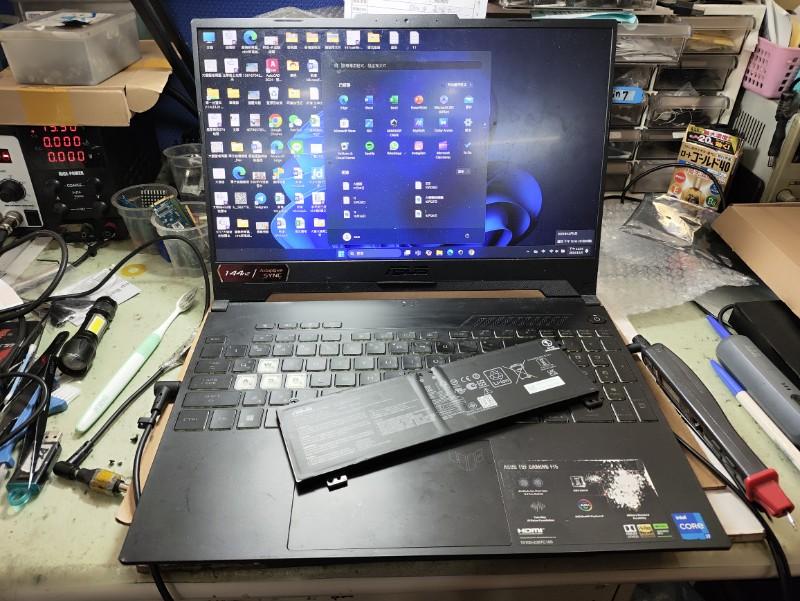
The ASUS TUF battery replacement cost depends on the exact laptop model, battery part number, battery capacity, generation, battery type, availability, and whether the replacement includes installation and service. A family name such as ASUS TUF Gaming is not enough to confirm an exact quotation.
ASUS TUF Gaming laptops have been released across multiple generations and configurations. Different TUF models can use different battery packs, capacities, connectors, and mounting arrangements. This means an ASUS TUF A15 battery may not be suitable for another A15 generation, even when the laptop names look similar.
For this reason, the battery model or complete laptop model identifier should be confirmed before purchasing a replacement. ASUS also provides an official Spare Parts Price Checker where users can search using their model name or serial number to identify compatible genuine ASUS spare parts.
ASUS TUF Gaming Battery Replacement Cost by Model
Use the model breakdown below to compare estimated ASUS TUF battery replacement costs in India. These are market-based estimates for battery replacement and service, not fixed ASUS prices. The exact cost can change according to the battery part number, capacity, availability, battery type, and service scope.
| ASUS TUF Model | Estimated Battery Replacement Cost | Typical Price Basis |
|---|---|---|
| TUF Gaming A14 | ₹4,000–₹5,500 | Model-specific internal battery + replacement service |
| TUF Gaming A15 | ₹3,500–₹5,000 | Battery part and capacity dependent |
| TUF Gaming F15 | ₹3,500–₹5,000 | Battery part and generation dependent |
| TUF Gaming FX506 | ₹3,500–₹4,600 | Compatible internal battery + replacement service |
| TUF Gaming FX507 | ₹4,000–₹5,500 | Generation and battery part dependent |
| TUF Gaming Dash F15 | ₹4,000–₹6,000 | Model-specific internal battery |
| TUF Gaming A16 | ₹4,000–₹5,500 | Battery capacity and generation dependent |
| TUF Gaming F16 | ₹4,000–₹5,500 | Battery capacity and generation dependent |
| TUF Gaming 17 / 18 | ₹4,000–₹6,000 | Large-capacity battery and model dependent |
| TUF Gaming F17 | ₹4,000–₹5,500 | Battery part and generation dependent |
| TUF Gaming A18 | ₹4,000–₹6,000 | Large-capacity internal battery |
Important: The prices above are estimated India-market replacement ranges. They should not be treated as fixed prices for every configuration. ASUS battery prices vary according to the exact model and battery capacity, and ASUS recommends checking the model or serial number through its Spare Parts Price Checker before purchasing a genuine replacement.
ASUS TUF Gaming A14 Battery Replacement Cost
- A14: Estimated battery replacement cost of ₹4,000–₹5,500.
- The exact battery part number and capacity should be confirmed against the complete A14 configuration before replacement.
- Newer A14 generations may use different battery packs, so an A14 battery from another generation should not be assumed to be compatible.
ASUS TUF Gaming A15 Battery Replacement Cost
- A15: Estimated battery replacement cost of ₹3,500–₹5,000.
- Older and newer A15 configurations can use different battery part numbers and capacities.
- Some TUF A15 configurations use batteries around 48Wh, while other generations can use higher-capacity battery configurations.
- Confirm the exact FA-series model and battery part number before ordering.
ASUS TUF Gaming F15 Battery Replacement Cost
- F15: Estimated battery replacement cost of ₹3,500–₹5,000.
- The battery specification can vary between F15 generations and configurations.
- Some F15 configurations use higher-capacity internal batteries, so the battery part number should be matched before replacement.
ASUS TUF Gaming FX506 Battery Replacement Cost
- FX506: Estimated battery replacement cost of ₹3,500–₹4,600.
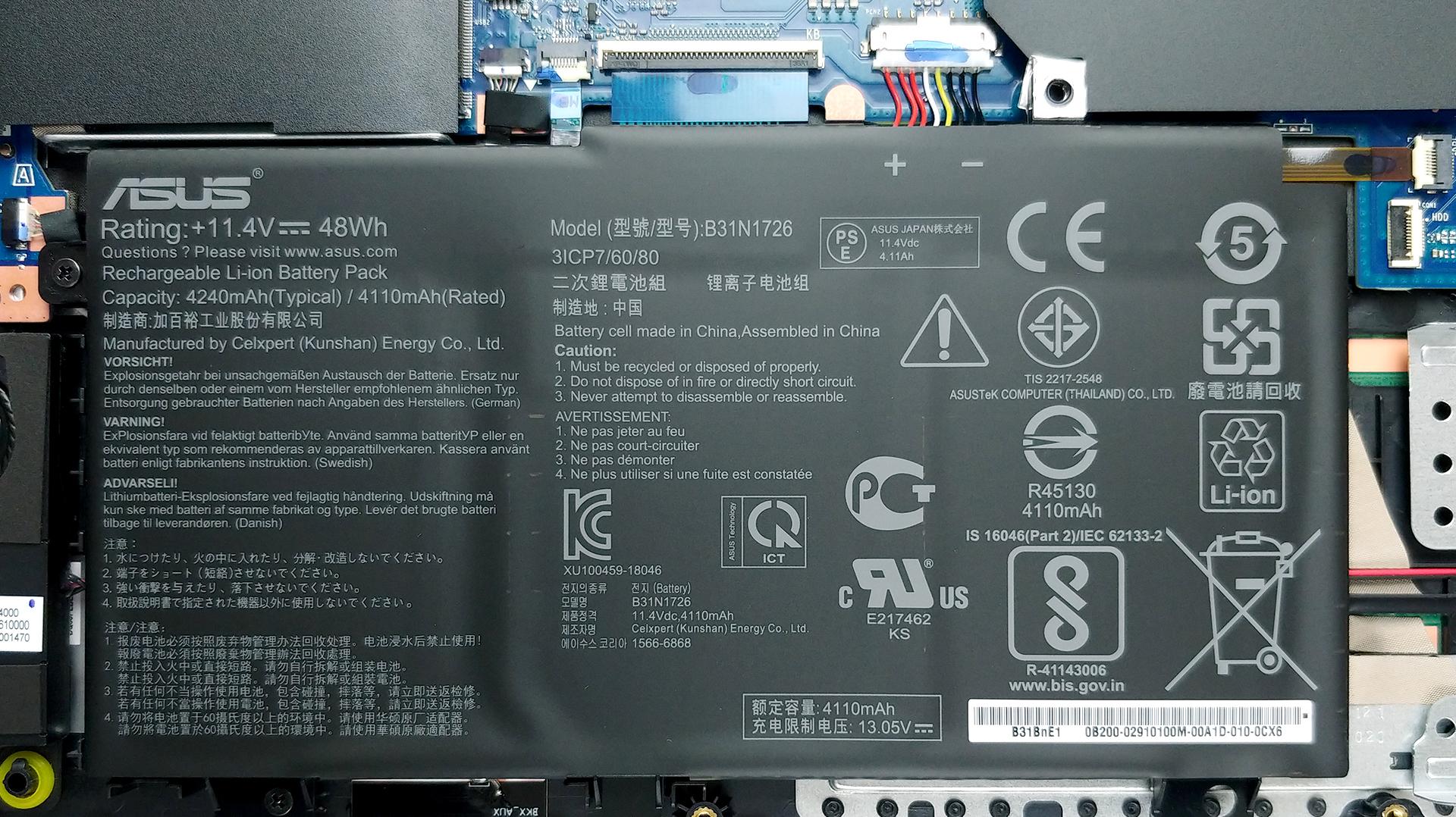
- Several FX506 configurations use ASUS battery part B31N1726 or other model-specific battery packs.
- ASUS currently lists the B31N1726 battery at ₹3,499 for supported models, including a number of FA506 and FX506 configurations.
- Compatibility should be confirmed using the complete laptop model before purchasing.
ASUS TUF Gaming FX507 Battery Replacement Cost
- FX507: Estimated battery replacement cost of ₹4,000–₹5,500.
- Different FX507 configurations can use different battery specifications.
- For example, ASUS lists C41N2013-1 as compatible with multiple FX507 configurations.
- The exact model identifier should be checked before selecting the replacement battery.
ASUS TUF Gaming Dash F15 Battery Replacement Cost
- TUF Dash F15: Estimated battery replacement cost of ₹4,000–₹6,000.
- The Dash F15 uses model-specific internal batteries and should not be matched only by laptop size or family name.
- Confirm the complete FX-series model and original battery part number before replacement.
ASUS TUF Gaming A16 Battery Replacement Cost
- A16: Estimated battery replacement cost of ₹4,000–₹5,500.
- A16 configurations can use relatively high-capacity internal batteries.
- Different generations may use different battery packs, so the exact FA-series model should be confirmed before ordering.
ASUS TUF Gaming F16 Battery Replacement Cost
- F16: Estimated battery replacement cost of ₹4,000–₹5,500.
- F16 configurations can use batteries with different capacities depending on the generation and configuration.
- Current ASUS TUF F16 models can use batteries such as 70Wh or 90Wh depending on the configuration, so the exact model is important when estimating replacement cost.
ASUS TUF Gaming 17 / 18 Battery Replacement Cost
- TUF 17 / 18: Estimated battery replacement cost of ₹4,000–₹6,000.
- Larger TUF models can use higher-capacity batteries than some 15-inch configurations.
- The exact battery part number and capacity should be confirmed before purchasing a replacement.
ASUS TUF Gaming F17 Battery Replacement Cost
- F17: Estimated battery replacement cost of ₹4,000–₹5,500.
- Battery specifications can vary across F17 generations.
- Check the full FX-series model identifier before selecting a replacement battery.
ASUS TUF Gaming A18 Battery Replacement Cost
- A18: Estimated battery replacement cost of ₹4,000–₹6,000.
- The A18 can use a higher-capacity internal battery depending on configuration.
- Exact replacement pricing should be confirmed against the model and battery part number.
The estimates above are intended to help users understand the likely cost range before requesting a quotation. The final ASUS TUF battery replacement cost should be confirmed after checking the exact laptop model, battery part number, battery condition, availability, and service requirements.
Why ASUS TUF Battery Replacement Cost Varies
A laptop battery is not a universal component. Even within the ASUS TUF Gaming series, different generations can use different battery packs. The final battery replacement price therefore depends on the exact battery required rather than simply the laptop’s family name.
Several factors can change the quotation:
- Exact laptop model: The complete model identifier is more useful than simply saying TUF A15, F15, or F16.
- Battery part number: The battery’s printed part number is one of the most useful identifiers when confirming compatibility.
- Battery capacity: Higher-capacity batteries can have different prices from smaller battery packs.
- Battery type: The replacement may be an original ASUS part, OEM-equivalent part, or compatible third-party battery, depending on the quotation.
- Battery availability: Older TUF models may require sourcing a compatible battery before the replacement can be completed.
- Service scope: A quotation may include the battery, installation, diagnosis, testing, pickup and delivery, or other services depending on the provider.
- Additional damage: A swollen or damaged battery may have affected the bottom cover, battery connector, screws, or surrounding components.
These variables explain why an ASUS TUF battery price found online should not automatically be treated as the final fitted replacement cost. A battery-only listing and a complete battery replacement service are not necessarily comparable.
Signs Your ASUS TUF Gaming Battery Needs Replacement
A degraded battery can gradually lose its ability to hold a charge. Some failures are obvious, while others appear as reduced battery runtime or unexpected shutdowns.
Battery Drains Much Faster Than Before
If your ASUS TUF Gaming laptop used to run for several hours on battery but now loses charge very quickly, battery capacity may have degraded. Gaming workloads naturally consume more power, but a major reduction in runtime during normal use can indicate battery wear.
Laptop Works Only When Connected to the Charger
If the laptop shuts down immediately after the charger is removed, the battery may no longer be able to provide usable power. However, charging circuitry and other power-related faults can produce similar symptoms, so diagnosis may be appropriate before ordering a battery.
Battery Percentage Drops Suddenly
A laptop that moves unexpectedly from a high battery percentage to a very low percentage or shuts down without warning may have a degraded battery. Battery health information in Windows can help provide additional evidence, but it does not replace a hardware inspection.
Battery Is Not Charging Properly
If the battery remains stuck at a particular percentage, repeatedly stops charging, or reports unusual charging behaviour, the battery may require replacement. However, the charger, charging circuit, battery connector, or software settings can also contribute to charging problems.
Battery Is Swollen
A visibly swollen battery should be treated as a safety concern. Do not continue pressing on the battery, attempting to puncture it, or using the laptop normally while ignoring the swelling.
If the bottom cover is lifting, the trackpad is rising, or the chassis appears distorted, stop using the device and have the battery assessed by a qualified technician.
How to Check ASUS TUF Battery Health
Before replacing the battery, you can check whether Windows is reporting significant battery degradation.
Generate a Windows Battery Report
Windows includes a battery-report feature that can provide information about the laptop’s battery capacity and usage history.
- Open Windows Terminal or Command Prompt.
- Run the Windows battery report command.
- Open the generated battery report in a browser.
- Compare the battery’s design capacity with its current full-charge capacity.
A substantial difference between design capacity and current full-charge capacity can indicate battery degradation. The report should be treated as one diagnostic indicator rather than the only basis for ordering a replacement.
Check Battery Status in Windows
Windows may also display charging and battery status directly in the taskbar or system settings. If the laptop repeatedly shuts down, refuses to charge, or reports battery-related warnings, further diagnosis may be useful.
How to Identify the Correct ASUS TUF Battery
Providing the correct model information is important because batteries with similar physical dimensions are not automatically interchangeable.
- Record the complete laptop model. Look at the label on the bottom of the laptop, the purchase documentation, or the system information. A model such as FX506 is more useful than simply saying ASUS TUF F15.
- Check the battery part number if accessible. Battery packs usually have a printed model or part number. Examples of ASUS battery identifiers include B31N1726 and C41N2013-1.
- Check the battery capacity. Look for information such as Wh, voltage, and cell configuration on the battery label or official documentation.
- Use ASUS’s official compatibility checker. ASUS allows users to search for compatible spare parts using the model name or serial number.
- Do not select a battery only because it looks similar. Connector arrangement, voltage, dimensions, capacity, mounting points, and electrical specifications all need to match.
- Share photographs when requesting a quotation. A clear photograph of the laptop’s model label and, where safely accessible, the battery label can help a technician identify the required part.
Avoid publicly sharing your laptop’s serial number when requesting a quotation. A repair provider generally needs the model information and relevant battery details rather than a publicly posted serial number.
Battery Specifications That Affect Compatibility and Cost
Battery compatibility involves more than physical size. The replacement battery should be checked against the laptop’s complete configuration and the original battery specification.
Battery Capacity
Battery capacity is commonly expressed in watt-hours (Wh). A higher Wh rating generally represents greater stored energy, but the replacement battery must still be electrically and physically compatible with the laptop.
For example, different ASUS TUF generations can use batteries with different capacities. Some current TUF configurations use batteries around 48Wh, while other TUF gaming configurations use 70Wh or 90Wh battery packs.
Voltage
The replacement battery should have the correct electrical specifications for the laptop. A battery should not be selected solely because it has a similar capacity or connector.
Connector and Physical Layout
The battery connector, cable arrangement, mounting points, dimensions, and internal layout should all be compatible with the laptop.
Cell Configuration
Battery specifications may describe the pack using configurations such as 3S1P or 4S1P. These details help identify the electrical design of the battery and should match the requirements of the laptop.
Battery Part Number
The battery part number is one of the strongest identifiers for replacement. A battery such as B31N1726 should only be used where ASUS or another reliable compatibility source confirms that it supports the specific laptop configuration.
Original ASUS Battery vs Compatible Battery
When replacing an ASUS TUF battery, you may encounter original ASUS batteries, OEM batteries, and compatible third-party alternatives.
Original ASUS Battery
An original ASUS battery is supplied as an ASUS spare part and is designed for specified ASUS laptop configurations. ASUS provides a Spare Parts Price Checker that allows customers to check genuine spare-part pricing by entering the model name or serial number.
OEM Battery
OEM terminology can refer to batteries manufactured for the original equipment supply chain. However, the term should not be treated as automatic proof of compatibility or quality. Ask for the actual manufacturer, part number, specifications, and warranty terms where relevant.
Compatible Battery
A compatible battery may be manufactured by a third party and designed to work with a specific ASUS laptop. Compatibility should be verified using the exact laptop model and battery specifications.
When comparing quotations, do not compare an unknown compatible battery with a verified ASUS replacement solely on price. The battery specification, condition, manufacturer, warranty, and service scope should all be considered.
What Is Included in an ASUS TUF Battery Replacement Quote?
A battery replacement quotation can contain more than the price of the battery itself. Before approving a repair, check whether the quoted amount includes the following:
- Replacement battery
- Battery installation
- Initial diagnosis
- Battery health or charging test
- Applicable taxes
- Pickup and delivery charges, if applicable
- Additional repair required because of battery swelling or physical damage
- Warranty on the replacement battery
ASUS notes that its final service estimate can vary after diagnosis and that the final invoice can include spare-part and applicable labour charges. Similarly, independent repair providers may quote a combined battery-and-service price.
Always ask whether the advertised amount is a battery-only price or a complete replacement price. This makes it easier to compare quotations from different providers.
What to Check Before Approving ASUS TUF Battery Replacement
Confirm the Exact Model
Ask the repair provider to confirm the exact model or configuration to which the quotation applies.
Confirm the Battery Part Number
Request the battery part number whenever possible. This reduces the risk of receiving a battery intended for another TUF generation.
Confirm Capacity and Electrical Specifications
Check that the proposed battery’s capacity, voltage, cell configuration, connector, and physical arrangement are appropriate for the laptop.
Confirm Whether Installation Is Included
A battery sold online for ₹3,500 is not necessarily equivalent to a ₹3,500 battery replacement service. One may be a part-only price while the other may include installation and testing.
Ask About Warranty
Ask for the applicable warranty duration and exclusions in writing. Warranty coverage can differ between original, OEM, and compatible replacement batteries.
Confirm Part Availability
If the laptop is an older TUF generation, ask whether the required battery is currently available or needs to be sourced.
Battery Replacement or Buy a New Laptop?
Replacing the battery is generally worth considering when the laptop still provides the performance you need and the battery is the primary problem.
An ASUS TUF Gaming laptop with a healthy processor, sufficient RAM, working SSD, and functional display can often remain useful even after its original battery has degraded.
Buying a new laptop may make more sense when the battery problem is combined with several other expensive faults, such as motherboard damage, display damage, storage failure, severe thermal problems, or structural damage.
Battery Replacement Usually Makes Sense When:
- The laptop performs normally when connected to the charger.
- The main problem is reduced battery runtime.
- The laptop otherwise meets your performance requirements.
- A compatible replacement battery is available at a reasonable cost.
- The laptop has no major motherboard, display, or structural problems.
Consider a New Laptop When:
- The battery is only one of several major hardware failures.
- The laptop requires an expensive motherboard or display repair at the same time.
- The laptop no longer meets your performance requirements.
- Multiple components are reaching the end of their useful life.
- The total repair cost becomes difficult to justify compared with a suitable replacement laptop.
Is It Safe to Replace an ASUS TUF Battery Yourself?
ASUS TUF Gaming laptops use internal batteries, so replacement generally requires opening the laptop and disconnecting the battery from the motherboard.
Although the procedure may look straightforward, an incorrect installation can damage the battery connector, motherboard, screws, cables, or battery itself.
Battery packs should also be handled carefully because lithium-ion batteries can become hazardous if punctured, crushed, overheated, or physically damaged.
If the battery is swollen, do not attempt to puncture, bend, crush, or force the battery out of the laptop. Professional assessment is recommended.
ASUS TUF Battery Replacement Process
A typical battery replacement process includes the following steps:
- Model identification: The laptop model and configuration are checked.
- Battery diagnosis: Battery health, charging behaviour, and visible physical condition are assessed.
- Part identification: The correct battery part number and specification are confirmed.
- Quotation: The battery, installation, and other applicable charges are explained before approval.
- Battery replacement: The old battery is safely disconnected and removed before the compatible replacement is installed.
- Testing: Charging, battery detection, power operation, and basic system behaviour are checked after installation.
- Final inspection: The laptop is checked for proper physical fit and normal operation before completion.
ASUS TUF Battery Replacement Service in Mumbai
IndiRepair provides ASUS laptop battery replacement services in Mumbai, including TUF Gaming models. The current published IndiRepair pricing for ASUS TUF battery replacement is approximately ₹3,999–₹4,999, although the final quotation can vary by model and battery type.
IndiRepair also provides pickup and drop service across Mumbai, Navi Mumbai and Thane, subject to service availability.
For an exact quotation, share the complete ASUS TUF model number and, if available, a photograph of the battery label. This allows the required battery to be identified before the replacement is approved.
Book your Asus laptop battery replacement with IndiRepair
Frequently Asked Questions
Q: How much does ASUS TUF battery replacement cost in India?
A: ASUS TUF battery replacement generally costs around ₹3,500–₹6,000 depending on the model, battery part number, capacity, battery type, availability, and whether installation is included. IndiRepair currently publishes a TUF battery replacement range of ₹3,999–₹4,999. The exact price should be confirmed against the laptop’s model and battery specification.
Q: How much does ASUS TUF A15 battery replacement cost?
A: An ASUS TUF A15 battery replacement can typically fall around ₹3,500–₹5,000 in India. The exact cost depends on the A15 generation and battery part number. Different A15 configurations can use different batteries, so the complete FA-series model should be confirmed before ordering.
Q: How much does ASUS TUF F15 battery replacement cost?
A: ASUS TUF F15 battery replacement is generally estimated at around ₹3,500–₹5,000. Older and newer F15 configurations can use different battery packs, so the exact battery part number should be checked before replacement.
Q: How much does ASUS TUF FX506 battery replacement cost?
A: ASUS TUF FX506 battery replacement can typically cost around ₹3,500–₹4,600 depending on the exact configuration and battery type. ASUS currently lists the B31N1726 battery at ₹3,499 for a range of supported FA506 and FX506 configurations. Installation and service charges may be separate depending on the provider.
Q: How much does ASUS TUF FX507 battery replacement cost?
A: ASUS TUF FX507 battery replacement is generally estimated at around ₹4,000–₹5,500. The exact price depends on the battery part number and configuration. ASUS currently lists the C41N2013-1 battery for multiple FX507 configurations.
Q: How do I know if my ASUS TUF battery needs replacement?
A: Common signs include very short battery life, sudden shutdowns, the laptop working only while connected to the charger, unusual charging behaviour, a battery that does not hold charge, or visible battery swelling. These symptoms can sometimes be caused by charging or power-circuit problems, so diagnosis may be required before replacing the battery.
Q: How long does an ASUS laptop battery usually last?
A: Battery lifespan varies with usage, charging habits, temperature, workload, and battery chemistry. ASUS states that most laptop batteries typically last around 2–4 years or approximately 300–500 charge cycles, although individual battery lifespan can vary.
Q: Can I use a higher-capacity battery in my ASUS TUF laptop?
A: A higher-capacity battery should not be installed simply because it physically fits. The voltage, connector, battery management system, dimensions, mounting arrangement, and laptop configuration all need to support the proposed battery. A compatible higher-capacity option can be considered only when the specific model supports it.
Q: Can I replace my ASUS TUF battery myself?
A: It is possible to replace an internal laptop battery with the appropriate tools and technical knowledge, but incorrect handling can damage the laptop or battery. A swollen battery should not be punctured, bent, crushed, or forcibly removed. Professional replacement is recommended when there is uncertainty about the battery or laptop.
Q: Does ASUS provide genuine replacement batteries?
A: Yes. ASUS provides genuine spare batteries for supported models and offers an online Spare Parts Price Checker. Customers can enter their ASUS model name or serial number to check compatible spare parts and estimated pricing. Exact availability and pricing can vary by model.
Q: Does battery replacement affect my laptop data?
A: A normal battery replacement does not require deleting the files stored on the SSD or hard drive. However, it is always recommended to maintain a current backup of important files before sending a laptop for repair, particularly if the device has additional hardware problems.
Q: What should I do if my ASUS TUF battery is swollen?
A: Stop using the laptop if possible and avoid pressing, puncturing, bending, or attempting to force the swollen battery out. A swollen lithium-ion battery should be handled carefully and assessed by a qualified technician.
Q: Is the ASUS TUF battery replacement price the same for every generation?
A: No. Different TUF generations can use different battery part numbers, capacities, and physical configurations. The ASUS TUF A15 battery price, F15 battery price, FX506 battery price, and newer FX507 or F16 battery prices can therefore differ. The exact model should be checked before a final quotation is provided.
Q: What information should I provide to get an exact ASUS TUF battery replacement quote?
A: Share the complete laptop model number, such as the full FA or FX configuration where available. A photograph of the laptop’s bottom model label and the battery label, if safely accessible, can also help. Mention whether the battery drains quickly, does not charge, shuts down unexpectedly, or is physically swollen. The final quotation should be based on the compatible battery part and the required service scope.
Conclusion
The final ASUS TUF battery replacement cost depends on the exact laptop configuration, compatible battery part number, capacity, battery type, availability, and service inclusions. A generic TUF battery price cannot reliably represent every A15, F15, FX506, FX507, A16, F16, F17, A18, or other TUF Gaming configuration.
Before purchasing a replacement battery, check the complete laptop model and, where possible, the original battery part number. Compare the battery specifications, warranty, installation charges, and service scope rather than comparing battery prices alone.
If the battery is swollen, the laptop shuts down unexpectedly, or the device only works when connected to the charger, professional diagnosis can help determine whether the battery itself needs replacement or whether another power-related component is responsible.
For a model-specific battery assessment and replacement quotation, share your ASUS TUF model number with IndiRepair.
Get your Asus laptop battery checked by IndiRepair
About the Author: Khan Rahil is a diploma holder in Computer Hardware with over 5 years of hands-on experience in laptop repairs and Senior Technician at IndiRepair. He has overseen hundreds of screen replacements, ensuring quality and customer satisfaction.