Is your IdeaPad spending more time plugged in than it used to? An accurate Lenovo IdeaPad battery replacement cost quote requires the exact laptop model and identification of a compatible battery. Reduced runtime can justify an assessment, but it does not establish which part needs replacing.
This guide explains model pricing status, cost factors, battery compatibility, replacement decisions and quotation inclusions. No verified battery prices are available for this guide, so there is no estimated price range. The useful comparison is a written quote for the correct part and the complete installation scope.
IdeaPad battery replacement cost by model
Use the model and generation breakdown below to compare battery replacement estimates.
| Model / generation | Estimated replacement cost | Price basis |
|---|---|---|
| Lenovo IdeaPad 1 11 | ₹2,000 – ₹3,500* | Compatible battery and service estimate |
| Lenovo IdeaPad 1 14 | ₹2,500 – ₹5,500* | Compatible battery and service estimate |
| Lenovo IdeaPad 1 15 | ₹2,500 – ₹5,500* | Compatible battery and service estimate |
| Lenovo IdeaPad 3 14 | ₹1,700 – ₹4,000* | Compatible battery and service estimate |
| Lenovo IdeaPad 3 15 | ₹1,700 – ₹4,000* | Compatible battery and service estimate |
| Lenovo IdeaPad 3 17 | ₹1,700 – ₹4,200* | Compatible battery and service estimate |
| Lenovo IdeaPad 5 14 | ₹3,500 – ₹5,500* | Compatible battery and service estimate |
| Lenovo IdeaPad 5 15 | ₹3,200 – ₹5,500* | Compatible battery and service estimate |
| Lenovo IdeaPad 5 16 | ₹4,000 – ₹6,500* | Compatible battery and service estimate |
Lenovo IdeaPad 1 11 battery Replacement Cost
- Lenovo IdeaPad 1 11: ₹2,000 – ₹3,500*
Lenovo IdeaPad 1 14 Series battery Cost
- Lenovo IdeaPad 1 14: ₹2,500 – ₹5,500*
Lenovo IdeaPad 1 15 series battery cost
- Lenovo IdeaPad 1 15: ₹2,500 – ₹5,500*
Lenovo IdeaPad 3 14 Series battery Cost
- Lenovo IdeaPad 3 14: ₹1,700 – ₹4,000*
Lenovo IdeaPad 3 15 series battery cost
- Lenovo IdeaPad 3 15: ₹1,700 – ₹4,000*
Lenovo IdeaPad 3 17 series battery cost
- Lenovo IdeaPad 3 17: ₹1,700 – ₹4,200*
Lenovo IdeaPad 5 14 Series battery Cost
- Lenovo IdeaPad 5 14: ₹3,500 – ₹5,500*
Lenovo IdeaPad 5 15 series battery cost
- Lenovo IdeaPad 5 15: ₹3,200 – ₹5,500*
Lenovo IdeaPad 5 16 series battery cost
- Lenovo IdeaPad 5 16: ₹4,000 – ₹6,500*
Confirm the exact model, generation and compatible part before relying on a quotation. Final price depends on model availability and the compatible battery part.
*Final price depends on the exact model, compatible battery part and current model availability.
Why Do Battery Replacement Quotes Vary?
Two battery quotes can look comparable while covering different products or services. A battery-only listing is not the same as an installed replacement that includes assessment and post-fitting checks.
- Compatible part: The quote should identify a supported battery for your exact machine, rather than rely on the IdeaPad family name alone.
- Sourcing and provenance: Genuine Lenovo and third-party options need clear descriptions and supporting sourcing information. Neither a higher price nor an “original” label proves authenticity.
- Installation scope: A component sale may exclude fitting, while a service quote may include it. The written offer should make that distinction clear.
- Diagnosis and additional work: An adapter, connector or charging-circuit fault is separate from battery replacement. Any assessment charges and additional repairs should be identified separately.
- Availability and logistics: Procurement, shipping, collection or delivery arrangements may affect the total and timing.
- Taxes and coverage: Quotes need consistent tax treatment and clearly stated warranty terms before they can be compared fairly.
When comparing an IdeaPad battery replacement cost, focus on what the total buys—not just the advertised component price. IndiRepair’s Lenovo laptop battery replacement service is a starting point for discussing the required replacement and confirming the quotation scope.
How to Identify Your IdeaPad and a Compatible Battery
The complete model or machine-type identifier helps distinguish machines that share a product-family name. A battery that looks similar is not necessarily electrically or physically compatible.
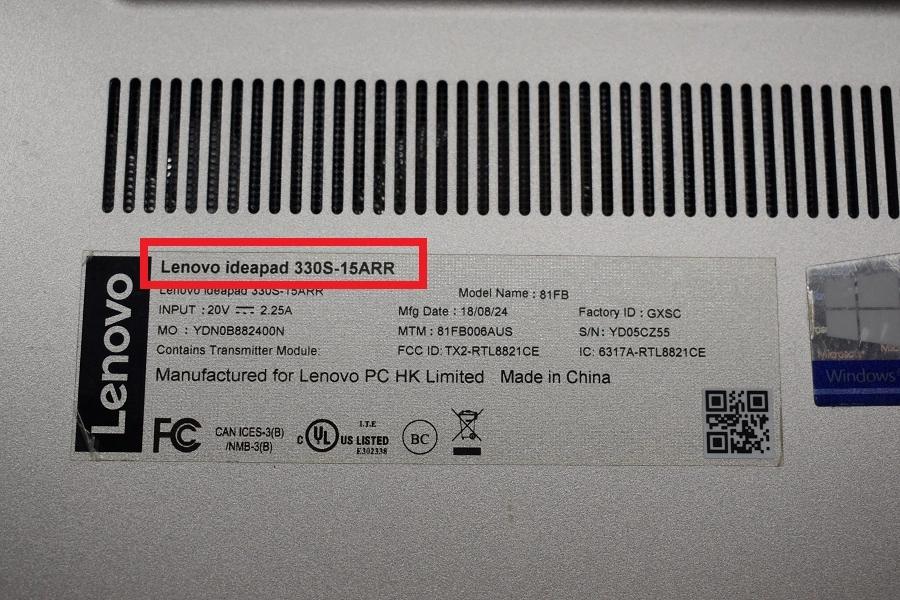
Use information available without dismantling the laptop. There is no need to open the casing solely to photograph an internal battery.
- Record the full laptop identifier. Look for the complete model or machine-type information on an accessible laptop label or in available system information. If the identification is unclear, consult official Lenovo documentation rather than guessing from the product name.
- Identify the supported battery reference. Use official Lenovo parts information or ask a qualified repair provider to establish the supported part or FRU reference. FRU means field-replaceable unit and is a part-identification reference, not a guarantee that every similarly labelled battery fits.
- Have the proposed replacement validated. The provider should match supported part references and relevant electrical and physical requirements, including the connector and fit. Appearance, screen size or cell count alone is insufficient.
- Request a part-specific quote. Share the exact model identifier and any safely available battery reference. Ask for the proposed compatible part to be named in writing. Keep serial numbers private in public posts or identification images.
IndiRepair has completed 500+ laptop repairs and has practical experience diagnosing laptop problems. That experience is useful when separating a replacement-part request from a fault that still needs assessment; the model identifier and symptoms provide the starting context.
With those details available, you can book your Lenovo laptop battery replacement with IndiRepair and request confirmation of compatibility and the proposed work.
Is Battery Replacement the Right Repair?
A replacement is worth considering when battery deterioration is established and the laptop otherwise meets your needs. Spending on a battery before confirming the fault can leave the original problem unresolved.
Battery Wear Versus Other Power Problems
Symptoms help narrow the assessment, but they are not a diagnosis by themselves:
- Reduced unplugged runtime: Battery wear is possible, but workload, settings and background activity also affect how long a charge lasts.
- Unexpected shutdowns: A battery unable to sustain power is one possibility. Other power or thermal faults can produce similar behaviour.
- Failure to charge: The battery, adapter, connector or charging circuitry may need assessment. A new battery will not necessarily resolve the issue.
- Failure to power on: This is not enough evidence to approve a battery purchase without further diagnosis.
A battery-health report can support the assessment by showing reported capacity information, where available. It cannot by itself confirm that the adapter, connector and charging circuit are working correctly. A qualified assessment should connect the reported condition with the laptop’s actual behaviour before recommending parts.
For the repair decision, consider the confirmed fault, the laptop’s wider condition, how much you need unplugged use and the complete repair quote. A useful laptop with an isolated battery problem presents a different value decision from one needing several unrelated repairs.
IndiRepair’s practical diagnostic experience is relevant when these symptoms overlap: poor runtime and failure to charge should not automatically lead to the same repair recommendation. If the cause remains uncertain, get your Lenovo laptop battery checked by IndiRepair before committing to a replacement part.
When Safety Takes Priority Over Price
Visible swelling or battery-related casing distortion means normal use and charging should stop. Seek qualified assistance rather than continuing to use the laptop while comparing prices. Do not press, puncture, flatten or attempt to remove a swollen internal battery yourself.
Extreme heat, smoke, sparks, a burning smell, liquid exposure or visibly damaged charging equipment also warrant stopping use. Disconnect external power only if it is safe to do so. Keep away from a smoking or burning device and seek emergency assistance if there is a fire risk. Follow official Lenovo safety guidance for your machine.
What Should Your Battery Replacement Quote Include?
A listed Lenovo IdeaPad battery price may describe only the component. The final installed replacement total should make the part, labour, applicable charges and service terms clear before you approve the work.
Part, Installation and Additional Charges
- Battery identification: The compatible part reference, stated source, and whether the battery is described as genuine Lenovo or third-party.
- Installation: Whether fitting and post-replacement checks are included, with the intended checks explained.
- Diagnosis: Any assessment charge and whether it remains payable if replacement does not proceed.
- Total scope: Applicable taxes, shipping, collection or delivery charges, rather than an incomplete headline price.
- Additional repairs: Separately described work that requires your approval, not assumed permission to replace other components.
- Old-battery handling: Whether safe collection or disposal is offered. This should be confirmed rather than treated as an automatic inclusion.
Availability, Warranty and Booking Terms
These details affect the buying decision even when the quoted battery itself is suitable:
- Availability: Confirmed stock status for the specific compatible part, not simply a statement that IdeaPad batteries are available.
- Timing: Separate estimates for procurement and installation, with any dependencies made clear.
- Warranty: Written coverage, exclusions and the claim process for the battery and workmanship, where offered.
- Booking terms: Quote validity, any deposit, and cancellation or return conditions, including what happens if compatibility cannot be confirmed.
For Lenovo laptop battery repair with IndiRepair, share the exact model or machine-type identifier and any safely available battery reference. Request confirmation of the compatible part, availability and full replacement quote. If the underlying fault is still unclear, professional diagnosis is the useful next step—not choosing a battery solely by price.
Frequently Asked Questions About IdeaPad Battery Costs
Q: Why can two quotes for the same IdeaPad differ?
A: The offers may cover different battery sources or different amounts of work. One may be a component-only price, while another includes fitting, assessment, taxes or delivery. Warranty and return terms may also differ. A meaningful comparison starts with a supported battery reference for the exact machine, followed by equivalent service scope. Ask for an itemised written total and the stated provenance of each part. A cheaper or more expensive quote is not automatically better evidence of compatibility or quality.
Q: Does the battery price include installation?
A: Only if the written offer says so. A Lenovo IdeaPad battery price shown in a component listing should not be treated as the final installed replacement cost. Fitting, assessment, post-replacement checks, taxes and transport may be included, excluded or quoted separately. Before approving the work, request the total payable for the agreed service and clarify any charge that remains due if you decline replacement after diagnosis. No provider’s installation or assessment policy should be assumed from a battery listing alone.
Q: How can I confirm a quote is for an original Lenovo battery?
A: An “original” description needs support from a compatible part reference, credible provenance documentation and clear invoice wording. A part number helps establish the intended fit, but a copied number or label alone does not prove authenticity. Similarly, an original Lenovo IdeaPad battery price cannot be authenticated simply because it is higher than another offer. Ask the seller what evidence supports the genuine-part claim and consult official Lenovo parts information for compatibility. If the sourcing claim remains unclear, do not treat it as verified.
Q: Can a third-party battery be a suitable alternative?
A: It may be an option, but suitability must be established for the exact laptop rather than assumed from a broad compatibility description. Supported electrical and physical requirements, credible sourcing, product documentation and clear warranty and return terms all matter. A similar shape or connector is insufficient evidence on its own. Third-party status does not establish a particular price, runtime, lifespan or safety standard. Ask a qualified provider to validate the proposed replacement and explain its documented suitability before you agree to purchase it.
Q: What if the compatible battery is not available?
A: Procurement timing needs confirmation for the specific supported part. A supplier may propose an alternative reference, but that alternative requires documented compatibility with your exact machine; a similar product name or appearance is not enough. Before paying a deposit, clarify the expected sourcing time, quote validity and cancellation conditions if the part cannot be supplied. Do not accept an unverified substitute merely to shorten the wait. If the existing battery is swollen or shows other safety warning signs, waiting for stock does not make continued use safe.
Q: Does a replacement battery come with a warranty?
A: Coverage depends on the supplier and the service agreement; there is no single warranty term that applies to every replacement. Battery-part coverage and installation-workmanship coverage may be separate, with different exclusions and claim processes. Request the terms in writing, including what is covered, who handles a claim and whether assessment or transport costs apply. Retain the invoice and part details. Neither an “original” description nor professional installation should be taken as a promise of coverage that the written agreement does not provide.
Q: Can I delay replacement if the battery still works?
A: A modest runtime decline may be tolerable if the laptop remains reliable and an assessment finds no safety concern. Replacement timing should reflect its confirmed condition and your need for portable use, rather than an arbitrary age limit. Unexpected shutdowns or worsening behaviour justify further assessment, especially if they interrupt work. Swelling, casing distortion, extreme heat or a burning smell are different: stop use and charging and seek qualified assistance. A battery still powering the laptop is not, by itself, proof that continued use is safe.
About the Author: Khan Rahil is a diploma holder in Computer Hardware with over 5 years of hands-on experience in laptop repairs and Senior Technician at IndiRepair. He has overseen hundreds of screen replacements, ensuring quality and customer satisfaction.