
A damaged screen on a Lenovo Legion laptop can significantly affect both gaming performance and everyday productivity. Whether the issue is a cracked panel, flickering display, vertical lines, or a completely black screen, replacing the display requires precision—especially because Legion laptops use high-performance gaming panels.
The Lenovo Legion screen replacement price in India typically ranges between ₹6,000 and ₹18,000+, depending on the exact model, refresh rate, and display resolution. High refresh rate gaming panels such as 165Hz or 240Hz displays usually cost more because they use advanced IPS panel technology designed for smooth gameplay and better color accuracy
In this guide, we break down Legion screen replacement pricing by series and explain the key factors that affect the final cost.
From a technician’s perspective, gaming laptops like Legion often use thinner, high-refresh IPS panels. While these displays deliver smoother gameplay and better color accuracy, they are also more delicate compared to standard laptop screens, which is why replacement cost can vary significantly between models.
If your Legion screen is cracked, flickering, showing lines, or completely black, you can check our Lenovo laptop screen replacement in Mumbai service for replacement options, pricing, and pickup details.
Why does the Lenovo Legion Screen Replacement Price Vary?
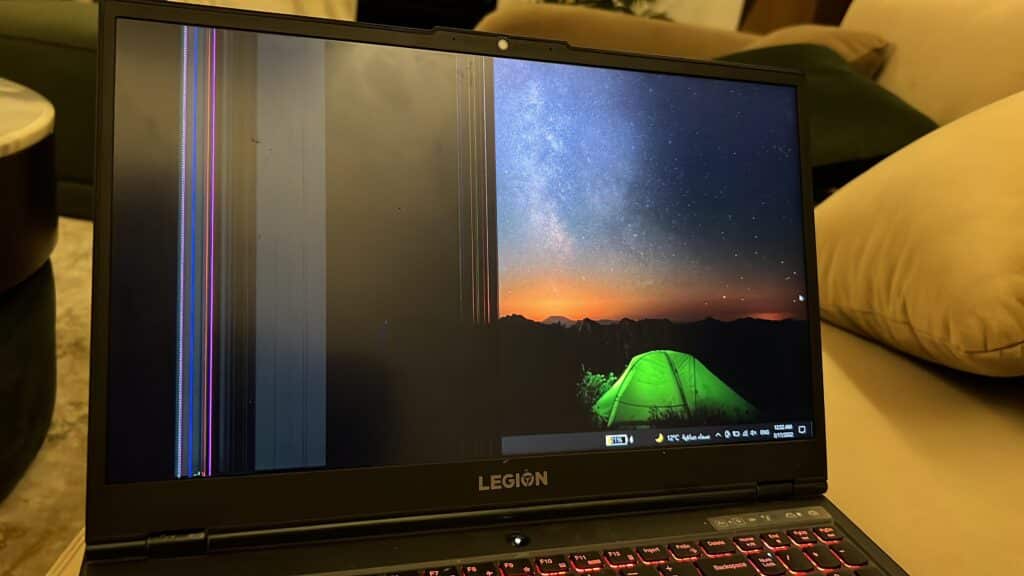
Legion laptops are designed with performance-focused display panels. Even within the same series, different variants can have significantly different screen specifications, which directly impacts replacement cost.
Below are the key factors that influence Legion display pricing.
1.Refresh Rate (60Hz vs 120Hz vs 144Hz vs 165Hz vs 240Hz)
Gaming laptops prioritize smooth visuals. Many Legion models feature high refresh rate panels such as 144Hz, 165Hz, or even 240Hz.
Higher refresh rate displays provide smoother motion during gameplay but also require more advanced panel technology.
Because of this, replacing a 165Hz or 240Hz panel usually costs more than replacing a standard 60Hz or 120Hz display.
2. Screen Resolution (Full HD vs QHD / WQXGA)
Most Legion laptops come with Full HD (1920 × 1080) displays. However, premium models like Legion Pro variants may feature QHD or WQXGA (2560 × 1600) panels.
Higher resolution panels also typically use improved backlight systems and higher quality display drivers.
3. Panel Technology (IPS & High Color Gamut)
Most Lenovo Legion laptops use IPS display panels, which are widely known for better viewing angles, improved color accuracy, and higher brightness compared to traditional TN laptop displays.
a. Wider viewing angles
b. Better color accuracy
c. Higher brightness levels
Compared to the older TN panels found in budget laptops, IPS gaming panels are more expensive due to superior visual performance.
Some Legion models also feature higher color gamut panels designed for content creators and gamers.
4. Slim Bezel & Thin Panel Construction
Modern Legion laptops use thin display assemblies with narrow bezels.
While this improves design and portability, it also means:
a. Panels are thinner and more delicate
b. Installation requires more careful handling
c. Replacement panels must match specific thickness and connector specifications
Because Legion panels vary by connector, resolution, and refresh rate, it’s important to verify the exact display before replacement. Our Lenovo screen replacement service can help confirm the correct panel specification for your laptop.
In our repair experience at IndiRepair, many Lenovo Legion displays use eDP connectors (typically 30-pin or 40-pin) depending on the panel resolution and refresh rate. Installing the wrong connector type or incompatible panel can result in flickering displays, brightness issues, or the screen not turning on at all, which is why proper compatibility checks are essential before replacing the panel.
How to Find the Correct Lenovo Legion Model Number

Before confirming the exact screen replacement price , it’s important to identify the full legion model number . Simply knowing “Legion 5” or “Legion 7” is not enough , as each series has multiple display variants.
Here are the easiest ways to find your exact model:
1. Check the bottom panel
Turn your laptop over and look for :
a. A white sticker
b. Full model name ( e.g . legion 5 15ACH6)
c. Machine Type Model (MTM) number
This information helps identify the exact display used in your laptop.
2. Use Windows System Information
a. Press Windows + R
b. Type msinfo32
c. Press Enter
d. Check “System model” and “System SKU”
These details help identify your laptop’s display configuration.
3. Check the BIOS
Restart your laptop and press F1, F2, or F12 during startup (this varies by model).
The BIOS screen usually displays the full system model information.
If you’re unsure about your exact Legion model or MTM number, share it with IndiRepair through our Lenovo laptop screen replacement service and we’ll verify the compatible panel before providing a quotation.
NOTE: Identifying the exact model number is important because even within the same Legion series, display specifications such as refresh rate and resolution can vary significantly.
Lenovo Legion Display Replacement Cost
The Lenovo Legion lineup is designed for high-performance gaming, which means the laptops often use premium display panels with higher refresh rates and improved color accuracy compared to standard laptops.
Legion laptops often feature:
a. High refresh rate panels (120Hz – 240Hz)
b. QHD / 2.5K resolutions
c. Advanced IPS displays
d. In flagship models, Mini-LED panels.
Because of these advanced specifications, screen replacement costs can be higher than standard laptops.
Lenovo Legion 5/5i Screen Cost
Common specification :
a. Screen size: 15.6-inch /16 – inch
b. Resolution : FHD(1920 * 1080)/ 2560 * 1600 (WQXGA)
c. Refresh rate: 120 Hz / 144Hz /165 Hz
d. Touch : Non – touch
Display price range:
a. Full HD 120Hz panel : ₹8000 – ₹11000*
b. Full HD 144 Hz panel / 165 Hz panel : ₹9000 – 13000*
c. 2.5K (2560 * 1600) 165Hz panels: ₹12000 – ₹16000*
Lenovo Legion 7/7i Screen cost
Common specification :
a. Screen size: 16 – inch
b. Resolution : 2560 * 1600 (WQXGA)/ 2560 * 1400
c. Refresh rate: 165 Hz / 240 Hz
d. Touch : Non – touch
Display price range:
a. 12.5K 165 Hz IPS Panel: ₹14000 – ₹18000*
b. 2.5K 240 Hz IPS panel : ₹16000 – ₹22000*
These panels are designed for competitive gaming and high frame rate performance, which increases their replacement cost.
Lenovo Legion Pro 5 / Pro 7 Screen cost
Common Specification:
a. Screen size : 16- inch
b. Resolution : 2560 * 1600 ( WQXGA)
c. Refresh rate: 165Hz / 240 Hz
e.Touch : non – touch
Display price range:
a. 2.5K 165Hz IPS panels: ₹15000 – ₹20000*
b. 2.5K 240Hz high brightness panels: ₹18000 – ₹ 24000*
Lenovo Legion 9i screen cost
Common Specifications:
a. Screen size: 16-inch
b.Resolution: 3.2K (3200* 2000)/mini- led panel
c. Refresh rate: 165Hz
d. Touch: non-touch
Display Price range:
a. 3.2K IPS panel: ₹22000 – ₹30000*
b. Mini-LED premium panel: ₹30000 – ₹45000*
The Legion 9i uses some of the most advanced laptop display panels available, which explains the significantly higher replacement cost.
Why Choose IndiRepair for Lenovo Legion Screen Replacement
Lenovo Legion laptops are built for high-performance gaming, content creation, and intensive multitasking, making display quality and refresh rate extremely important for the overall user experience. Since Legion laptops feature high refresh rate panels, advanced graphics support, and color-accurate displays, screen replacement requires precision and proper compatibility to maintain the original gaming performance.
At IndiRepair, every Lenovo Legion laptop undergoes a detailed diagnostic process before any screen replacement is recommended. This helps identify whether the issue is caused by the display panel, GPU output, display cable damage, refresh rate instability, or another internal hardware fault. Accurate diagnosis ensures the correct repair solution is applied instead of unnecessary replacements.
For screen replacements, only tested and specification-compatible display panels are used that match the laptop’s original resolution, brightness levels, panel quality, color accuracy, and refresh rate support. This is especially important for Lenovo Legion gaming laptops where maintaining 120Hz, 144Hz, 165Hz, or higher refresh rates directly affects gaming responsiveness and visual smoothness.
Whether the issue involves a cracked screen, display flickering, dead pixels, black spots, horizontal lines, backlight issues, or complete display failure, IndiRepair focuses on restoring the original visual experience and gaming performance of the laptop instead of offering temporary fixes.
With transparent pricing, experienced technicians, quick turnaround times, and pickup and drop support, IndiRepair aims to provide a smooth, reliable, and hassle-free Lenovo Legion screen replacement experience for gamers and power users.
Frequently Asked Questions (FAQs)
Q: How much does Lenovo charge for Legion screen replacement ?
A: The cost of Lenovo Legion screen replacement in India typically ranges between ₹6,000 and ₹18,000+, depending on the model, refresh rate, and display resolution. Premium Legion laptops with 165Hz, 240Hz, or higher resolution panels may cost more because these displays use advanced gaming panel technology.
Q: Can a 144Hz or 165Hz Legion screen be replaced with a regular 60 Hz screen?
A: Technically, some models may support lower refresh rate panels, but this is generally not recommended. Installing a lower-spec display can reduce gaming performance and limit the laptop’s original capabilities. Using an OEM-equivalent replacement panel ensures the same refresh rate and display quality as the original screen.
Q: Will my data be lost during legion screen replacement?
A: No. Screen replacement does not affect your SSD or hard drive. Your data remains safe unless there is additional internal damage unrelated to the display .
Q: Does Lenovo warranty cover cracked Legion screens?
A: Standard manufacturer warranty usually does not cover accidental physical damage, including cracked displays.However, if your laptop has accidental damage protection, coverage may depend on the terms of that specific policy.
Q. How long does Lenovo Legion screen replacement take?
A:In most cases, Lenovo Legion screen replacement takes between 2 to 4 hours when the correct replacement panel is available. However, if a specific panel needs to be sourced, the repair may take 1–2 days depending on availability.
CONCLUSION
A damaged display does not necessarily mean replacing your entire Lenovo Legion laptop. In most cases, replacing the screen restores the laptop to its original gaming performance and display quality.
Because Legion laptops come with different refresh rates, resolutions, and panel technologies, the exact replacement price depends on your specific model and display configuration.
Identifying the correct model number ensures accurate pricing and proper panel compatibility. If the rest of the laptop is functioning well, replacing the screen is often a practical and cost-effective solution compared to purchasing a new gaming laptop.
Ensuring the correct panel compatibility and professional installation helps maintain the original refresh rate, color accuracy, and overall gaming experience of the laptop.
With transparent pricing, experienced technicians, quick turnaround times, and pickup and drop support, IndiRepair aims to provide a smooth and reliable replacement experience. You can get an exact Lenovo screen replacement quotation by sharing your Legion model number with us before the repair.
Written by Khan Rahil, a Senior Laptop Repair Technician at IndiRepair with over 5 years of hands-on experience in laptop hardware repairs. He specializes in laptop display diagnostics, compatibility verification, and precision screen replacements, and has personally handled hundreds of Lenovo laptop screen repair cases.