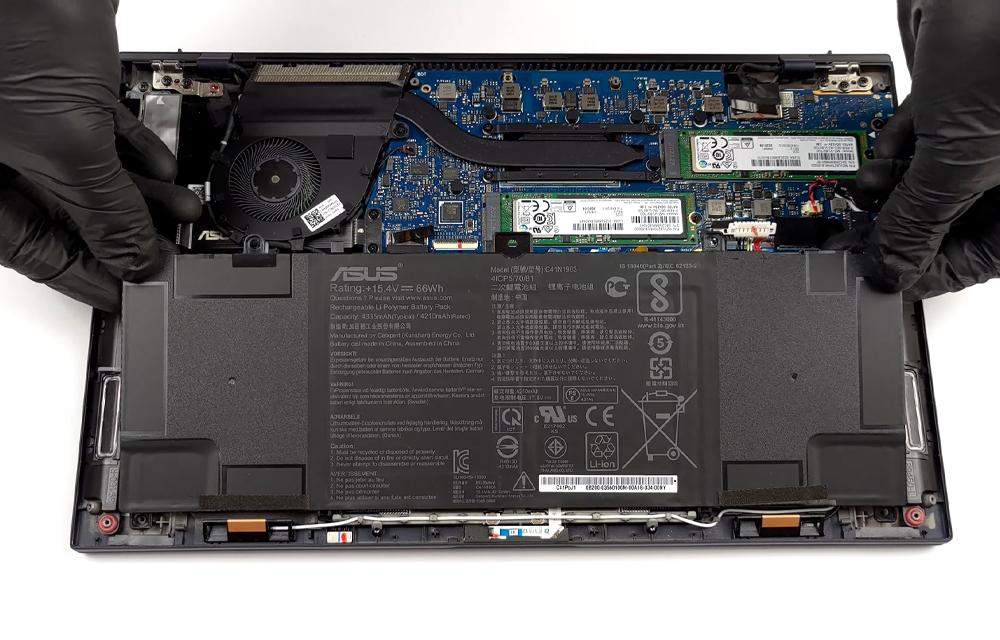
If your ASUS ExpertBook no longer holds charge, the battery replacement cost is likely your first concern. However, an accurate quote cannot be confirmed from the ExpertBook family name alone. The complete hardware model and the compatible battery must be identified before the component price and service scope can be assessed.
This guide explains the available model cost information, why ASUS ExpertBook battery replacement prices vary, how to confirm the correct replacement battery, what a quotation should include and when professional service may be more practical than buying a part independently. No battery price should be assumed from the appearance of the battery or from a different ExpertBook model.
Use safely accessible model information when requesting a quote, and ask the provider to confirm compatibility before purchase or installation.
ExpertBook battery replacement cost by model
Use the model and generation breakdown below to compare battery replacement estimates. Battery replacement costs can vary depending on the exact model, generation, battery capacity, part number and replacement battery type.
ASUS ExpertBook laptops are available in multiple configurations, and battery specifications can differ between models and generations. The exact model number and battery part number should be confirmed before replacement.
The ASUS ExpertBook Flip 14 name covers multiple configurations, so the exact model number should be checked to identify the correct battery.
For 16-inch ExpertBook models, the exact model code should be confirmed before ordering a replacement battery, as battery specifications can vary between configurations.
The ASUS ExpertBook B6 Flip 16 is available in different configurations, so confirming the complete model number helps ensure the correct battery is selected.
| Model / generation | Estimated replacement cost | Price basis |
|---|---|---|
| ASUS ExpertBook B3 14 | ₹3,500–₹5,500 | Estimated India replacement cost |
| ASUS ExpertBook B5 14 | ₹4,000–₹6,000 | Estimated India replacement cost |
| ASUS ExpertBook P3 14 | ₹3,500–₹5,500 | Estimated India replacement cost |
| ASUS ExpertBook BM1 | ₹3,000–₹5,000 | Estimated India replacement cost |
| ASUS ExpertBook Flip 14 | ₹4,000–₹6,000 | Estimated India replacement cost |
| B3 | ₹4,000–₹6,000 | Estimated India replacement cost |
| ASUS ExpertBook B5 16 | ₹4,500–₹6,500 | Estimated India replacement cost |
| ASUS ExpertBook P3 16 | ₹4,000–₹6,000 | Estimated India replacement cost |
| ASUS ExpertBook B6 Flip 16 | ₹5,000–₹7,500 | Estimated India replacement cost |
ASUS ExpertBook B3 14 battery replacement Cost
- ASUS ExpertBook B3 14: ₹3,500–₹5,500, depending on the exact model, battery part number and replacement battery type.
ASUS ExpertBook B5 14 battery Replacement Cost
- ASUS ExpertBook B5 14: ₹4,000–₹6,000, depending on the exact model, battery capacity and compatible part number.
ASUS ExpertBook P3 14 battery Replacement Cost
- ASUS ExpertBook P3 14: ₹3,500–₹5,500, depending on the exact model and compatible battery.
ASUS ExpertBook BM1 battery replacement cost
- ASUS ExpertBook BM1: ₹3,000–₹5,000, depending on the exact model and battery part number.
ASUS ExpertBook Flip 14 battery Replacement Cost
- ASUS ExpertBook Flip 14: ₹4,000–₹6,000, depending on the exact configuration and compatible battery.
ASUS ExpertBook 16 – inch battery Replacement Cost
- B3: ₹4,000–₹6,000, depending on the exact 16-inch model configuration and compatible battery part number.
ASUS ExpertBook B5 16 battery Replacement Cost
- ASUS ExpertBook B5 16: ₹4,500–₹6,500, depending on the exact model, battery capacity and compatible part number.
ASUS ExpertBook P3 16 battery Replacement Cost
- ASUS ExpertBook P3 16: ₹4,000–₹6,000, depending on the exact model and compatible battery.
ASUS ExpertBook B6 Flip 16 battery Replacement Cost
- ASUS ExpertBook B6 Flip 16: ₹5,000–₹7,500, depending on the exact configuration, battery capacity and compatible part number.
Confirm the exact model, generation and compatible part before relying on a quotation. Final pricing may vary based on battery availability, battery type and the specific configuration of your laptop.
Why ASUS ExpertBook battery replacement quotes vary
The ASUS ExpertBook battery replacement price depends on more than the brand and product family. The exact laptop model, the battery identified for that model, component sourcing and the work included in the service can all affect the final quotation. A component-only listing and a complete replacement service are not necessarily comparable.
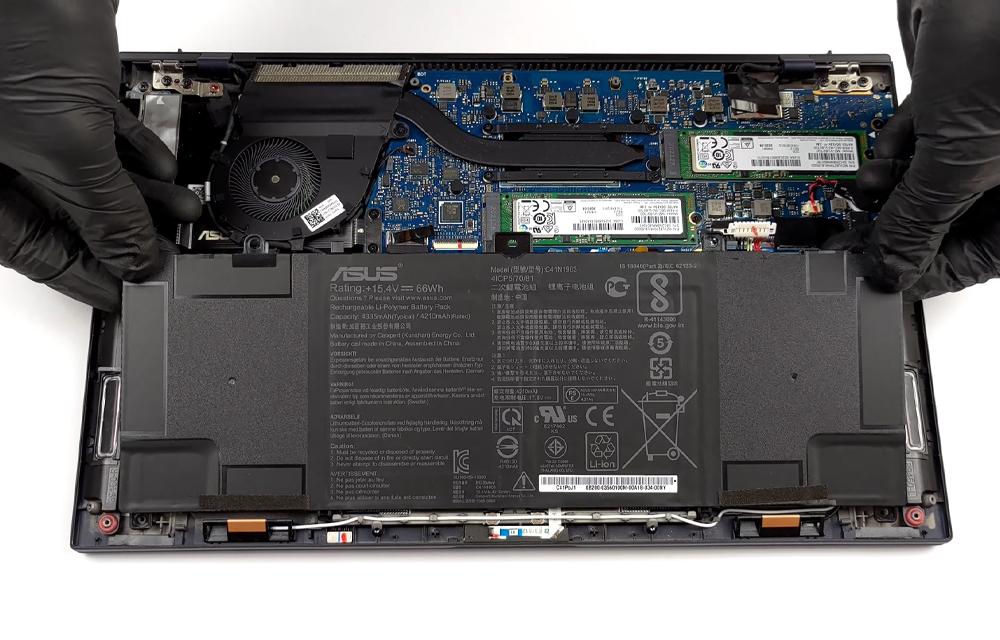
- Exact model identification: Different ExpertBook models and configurations may require different battery assemblies. A broad label such as ASUS ExpertBook or B1 is not enough to establish compatibility.
- Battery part matching: The proposed replacement should be checked against the laptop model and the available battery identification information. Visual similarity alone is not proof of a correct match.
- Component sourcing: An original, manufacturer-supplied or compatible replacement description may lead to different quotations. The seller’s terminology and applicable terms should be confirmed rather than assumed.
- Availability: The price or quotation status may depend on whether the exact battery is available or needs to be sourced and verified.
- Service scope: Inspection, fitting, testing, old-part handling and any additional repair may be separate from the battery component price.
- Underlying fault: Charging interruptions, sudden shutdowns or poor runtime can sometimes involve the charging path or another hardware issue, so a battery quotation is not automatically a confirmed diagnosis.
For readers who want to begin with model-matched guidance rather than choosing a part from a generic listing, Asus laptop battery replacement service is a relevant next step.
How to confirm the correct ASUS ExpertBook battery
The complete hardware model is more useful than a general family name. Before requesting an ASUS ExpertBook battery price in India, collect information that can be safely accessed from the laptop, its documentation or system information. Avoid opening the laptop solely to identify a battery if you are not comfortable handling the device.
- Record the complete model designation exactly as shown on the device or in safely accessible system information.
- Provide serial or product information if it is readily available and appropriate to share with the service provider.
- Share battery label details only when the label is already safely accessible; do not remove covers or disturb a damaged battery just to read it.
- Describe the observed concern, such as rapid discharge, failure to retain charge, charging interruptions or unexpected shutdowns.
- Tell the provider if the battery appears swollen, unusually hot, damaged or otherwise unsafe.
- Ask for confirmation that the proposed battery matches the exact model before ordering or installing it.
Battery voltage, capacity, connector type, physical dimensions and part-number compatibility should not be inferred from another ExpertBook generation. Any model-specific battery code or specification should be verified for the exact device before it is treated as evidence.
What information should be included with a quote request?
A clear quote request helps the provider distinguish a battery replacement enquiry from a general charging fault. It also reduces the risk of comparing a battery-only listing with a quotation that includes inspection and fitting.
- The complete ASUS ExpertBook model designation.
- A concise description of the battery or charging symptoms.
- Any safely accessible battery identification detail.
- Whether the laptop is still usable on the charger or shuts down unexpectedly.
- Whether there is any visible swelling, heat, damage, smoke or unusual smell.
- A request for separate clarification of the battery component, fitting, testing and any additional charges.
The provider should confirm the exact match before purchase. If the model information is incomplete, the responsible quotation may remain conditional until the device or its identifying details can be checked.
Compatibility checks that should not be assumed
Names such as ASUS ExpertBook B1, B1400 and B1500 may appear in battery listings or search results, but those names alone do not prove that batteries are interchangeable. Related product labels can cover different hardware configurations, revisions or battery assemblies.
- Do not assume that a battery advertised for an ASUS ExpertBook B1 fits every B1-related model.
- Do not treat the battery’s shape or connector appearance as proof of electrical compatibility.
- Do not infer an ASUS ExpertBook B1 battery price from a different model or generation.
- Do not use a B1400 or B1500 listing as evidence that the same battery fits another ExpertBook.
- Require exact model and battery identification before ordering, especially when a listing uses only a family name.
When replacement makes sense and what the quote should cover
A replacement may be worth considering when reduced battery performance is disrupting normal work and the laptop otherwise meets your needs. Even then, symptoms should be treated as clues rather than proof that the battery is the only failed component. A proper quotation should identify what is being replaced and what work is included.
- Runtime has become noticeably shorter during normal use.
- The laptop no longer retains charge when disconnected from the charger.
- Charging interruptions affect ordinary work.
- The system displays a battery-related warning.
- The laptop shuts down unexpectedly when external power is removed.
Stop using the laptop and seek professional guidance if the battery is swollen, smoking, sparking, leaking, melting, extremely hot or accompanied by a burning smell. The same applies if there are exposed wires, liquid exposure, a visibly damaged charging port or a damaged charger. Do not squeeze, puncture or continue testing a visibly damaged battery.
With experience across 500+ laptop repairs, IndiRepair focuses on identifying the underlying fault before recommending a replacement. That practical approach helps separate a battery component issue from symptoms that may need further inspection.
book your Asus laptop battery repair with IndiRepair
Battery-only purchase versus professional replacement
A battery-only purchase may appear straightforward, but it places the responsibility for model identification, compatibility and installation on the buyer. Professional replacement may be useful when the exact battery cannot be confidently identified, when the battery is unsafe to handle or when the charging symptoms do not clearly point to the battery.
| Consideration | Battery-only purchase | Professional replacement |
|---|---|---|
| Identification | The buyer must confirm the complete model and battery match. | The provider can review the available model and battery information before proceeding. |
| Compatibility risk | A generic product-family listing may not be sufficient evidence of compatibility. | The proposed part can be checked against the device before installation. |
| Installation | The buyer remains responsible for safe fitting and handling. | Fitting can be included within the agreed service scope. |
| Testing | Testing arrangements depend on the buyer and seller. | The quotation can clarify whether inspection and post-replacement testing are included. |
| Further diagnosis | A battery purchase does not confirm that the battery caused every charging symptom. | A diagnostic review may help identify whether another fault also needs attention. |
Neither option should be selected solely because a listing uses the ASUS ExpertBook name. The relevant requirement is a verified match for the individual laptop and a clear understanding of what the quoted service covers.
What a complete quotation should clarify
Before approving an ASUS ExpertBook battery replacement cost, ask for an itemized explanation. This makes it easier to compare quotations without treating different service scopes as equivalent.
- The exact ASUS ExpertBook model used for the quotation.
- The battery identity and how compatibility was confirmed.
- Whether the quoted amount covers the battery component, labour, inspection and testing.
- Whether the quotation depends on battery availability or further diagnosis.
- How the old battery will be handled or returned, if applicable.
- Any warranty, return or after-service terms only where the provider explicitly confirms them.
IndiRepair recommends treating charging behaviour as diagnostic evidence, not automatic proof that one component has failed. A laptop that charges intermittently, shuts down or reports a battery issue may need the battery and charging path considered together. Get your Asus laptop battery checked by IndiRepair when the correct part or the cause of the symptom is uncertain.
Frequently Asked Questions
Q: Why can’t one ASUS ExpertBook battery replacement price apply to every model?
A: The ExpertBook name covers multiple models and configurations, so the required battery may differ from one device to another. The quote can also change depending on whether the battery is available, how it is sourced and whether the amount includes inspection, fitting and testing. A battery listing that mentions ASUS ExpertBook generally is not enough to confirm suitability. Provide the complete hardware model and ask the seller or technician to verify the battery match before purchase. Do not use a price for one ExpertBook model as a guide to another model without verified information.
Q: How do I check which battery my ASUS ExpertBook needs?
A: Start with the complete model designation from safely accessible device information, documentation or system information. If a battery label is already visible without unsafe dismantling, its identifying details may also help. Share the charging symptoms and ask the provider to confirm the proposed battery against the exact model. Do not open the laptop unnecessarily, especially if the battery is swollen, hot or damaged. The model family, battery appearance or an online listing title should not be treated as sufficient proof of compatibility.
- Complete hardware model
- Safely accessible battery identification
- Description of charging and runtime symptoms
- Any visible damage or swelling
Q: Is an ASUS ExpertBook original battery always the right choice?
A: The most important first requirement is a verified match for the exact laptop. Sellers may use terms such as original, manufacturer-supplied or compatible replacement in different ways, so those descriptions should be clarified before purchase. Ask for the battery identity, compatibility confirmation and the applicable return or service terms. Do not assume that a product labelled original is suitable without checking the model, and do not assume that a compatible replacement has particular performance, longevity or warranty characteristics unless those details are explicitly confirmed for the proposed part.
Q: Are ASUS ExpertBook B1, B1400 and B1500 batteries interchangeable?
A: Interchangeability cannot be confirmed from those names alone. They should be treated as model or family identifiers that require further checking, not as proof that one battery fits every related device. The complete hardware model and the battery identification should be compared before ordering. Ask the provider to confirm the exact match and whether the quotation is conditional on availability.
- Do not rely only on the family name.
- Do not substitute a visually similar battery.
- Request model and part matching before purchase or installation.
Q: What should be included in an ASUS ExpertBook battery replacement quote?
A: A useful quote should identify the exact laptop model and the compatible battery being proposed. It should also clarify whether the amount covers the component, inspection, fitting, testing and any other applicable service charges. If availability or further diagnosis could change the quotation, that condition should be stated. Warranty, return arrangements and old-part handling should be treated as provider-specific terms rather than assumed. Comparing the total amount is meaningful only when the quotations cover a similar scope of work.
- Exact model identification
- Battery compatibility confirmation
- Component and labour scope
- Inspection and testing details
- Availability and provider-specific terms
Q: What if the required ASUS ExpertBook battery is unavailable?
A: Ask the provider to confirm the sourcing status for the exact compatible battery and whether the quotation is subject to availability. If an alternative is proposed, request its exact identification and compatibility confirmation before approving it. Do not substitute a battery merely because it has a similar shape, connector or product-family description. If the battery cannot be confidently identified, a professional inspection may be more sensible than ordering an unverified part. Stock status, sourcing time and any alternative arrangement should be confirmed by the provider rather than assumed.
Q: Should I replace the battery myself?
A: That decision should account for accurate identification, safe handling, fitting and testing, not just the advertised battery price. Do not proceed from a generic ASUS ExpertBook listing without confirming the exact model and battery match. Professional guidance is especially appropriate if the battery is swollen, unusually hot, damaged, leaking, smoking or difficult to identify. Stop using the laptop if there are sparks, a burning smell, exposed wires, melting or liquid exposure. A service provider can also help determine whether the battery is actually responsible for the charging or shutdown symptoms.
- Use professional guidance for a swollen or damaged battery.
- Do not puncture, squeeze or continue testing an unsafe battery.
- Confirm compatibility before purchase or installation.
- Ask whether fitting and testing are included in the service scope.
Conclusion
An accurate ASUS ExpertBook battery replacement cost cannot be confirmed from the product-family name alone. The complete hardware model, compatible battery identification, availability and service scope all need to be considered. Before approving a quote, check whether it covers the component, fitting, inspection, testing and any additional work.
IndiRepair can help readers move from a general battery-price search to a model-matched service discussion. Provide the identifying information that is safely available, describe the symptoms and ask for compatibility confirmation before purchase or installation.
For professional guidance on the next step, consider Asus laptop battery replacement with IndiRepair without assuming a price, part or outcome until the device and battery requirements have been reviewed.
About the Author: Khan Rahil is a diploma holder in Computer Hardware with over 5 years of hands-on experience in laptop repairs and Senior Technician at IndiRepair. He has overseen hundreds of screen replacements, ensuring quality and customer satisfaction.