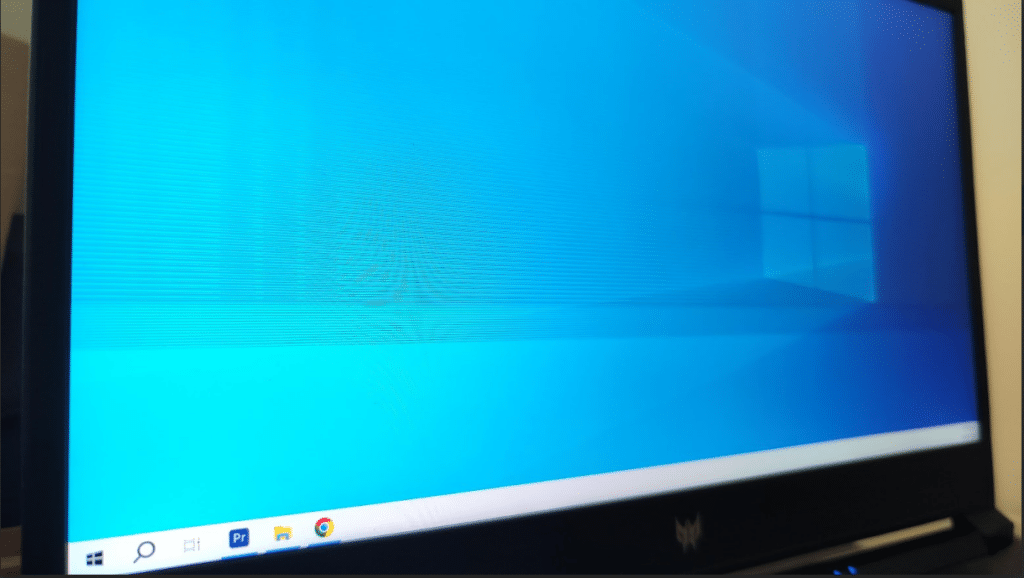
If you’re noticing lines on your Acer laptop screen – whether they’re vertical, horizontal, black or colored – it’s usually more than just a minor display glitch. In many cases, these lines appear suddenly and start interfering with normal usage, making even simple tasks like reading or working difficult.
What makes this issue confusing is that the cause isn’t always obvious. Sometimes it’s a temporary software problem, but in many real-world cases, visible lines are linked to hardware faults like a damaged screen panel or internal connection issues.
The key is identifying the exact cause early – because while some issues can be fixed with simple steps, others require a proper repair or screen replacement to fully resolve.
Why There Are Lines On Your Acer Laptop Screen
When lines appear on an Acer laptop screen, they are not random visual glitches – they are usually a result of signal disruption or pixel-level failure somewhere in the display system. Below are some of the main reasons it happens
1. Screen Panel Damage
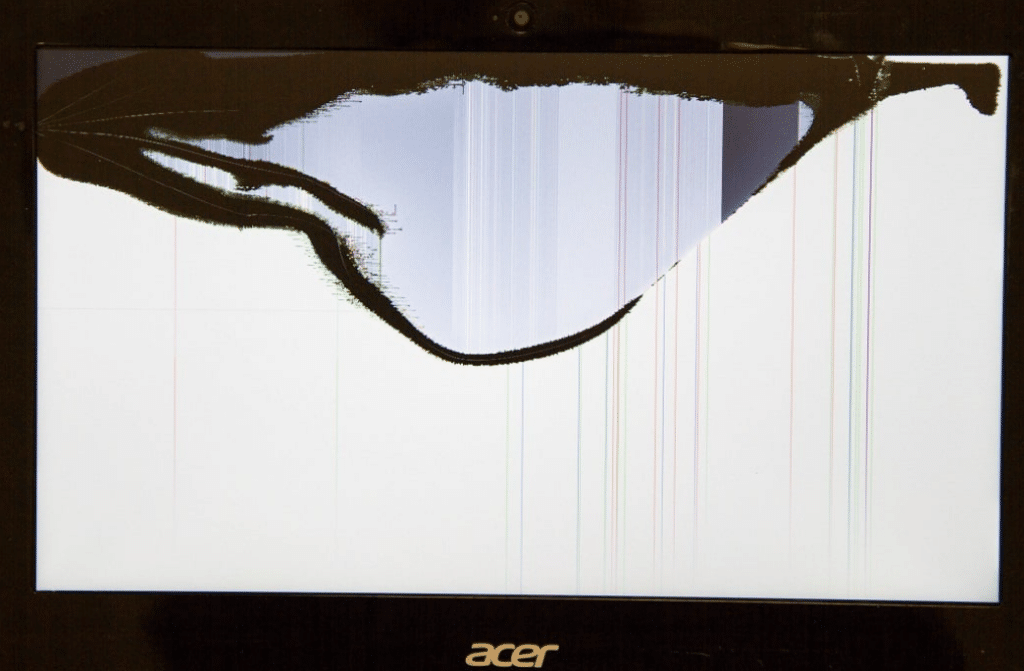
The laptop screen is made up of thousands of tiny pixels arranged in rows and columns. When a section of these pixels stops functioning properly, it shows up as vertical or horizontal lines on the display.
In our experience handling Acer laptop repairs, nearly 60–70% of cases where lines are fixed in position (not moving) are caused by screen panel damage rather than software issues.
2. Loose Or Damaged Display Cable
Your laptop screen is connected to the motherboard through a thin internal cable that passes through the hinge. Over time, this cable can wear out due to constant opening and closing of the laptop. This is especially common in laptops that are frequently opened and closed. Over time, the cable weakens near the hinge, leading to intermittent or position-based display issues.
3. GPU Issues
The GPU (graphic processor) is responsible for generating everything you see on your screen. If the GPU starts malfunctioning, it can send corrupted signals to the display. GPU- related problems usually require advanced repair or motherboard-level work.
Unlike screen-related problems, GPU issues usually affect all displays, including external monitors. This is an important distinction when diagnosing the problem.
4. Driver or Software Conflicts
In some situations, lines can appear due to software issues – especially after system updates or driver conflicts. These lines are usually not fixed in position and may disappear after restarting, updating drivers, or booting into safe mode. Unlike hardware issues, they don’t worsen over time.
Step-by-Step Troubleshooting for Lines on Acer Laptop Screen
The display system in a laptop works through a chain — the GPU processes visuals, sends signals through the display cable, and the screen panel renders the output. Any disruption in this chain can result in visible lines on the screen.
The steps below are designed to help you identify the exact cause, not just try random fixes.
Step 1: Check if the Lines Appear in BIOS
This step tells you instantly whether the issue is software or hardware.
What to do:
a. Turn off your laptop
b. Turn it on and immediately press F2 to enter BIOS
c. Observe the screen carefully
What this means:
a. Lines are visible in BIOS → Hardware issue (screen or cable).
b. No lines in BIOS → Likely software or driver issue.
This is one of the most reliable ways to separate software vs hardware problems.
Step 2: Test with an External Monitor
This helps you isolate whether the issue is with the screen or internal components.
What to do:
a. Connect your laptop to a TV or external monitor using HDMI
b. Press Windows + P
c. Duplicate the screen
d. Observe the screen
What this means:
a. External display is clear → your laptop screen is faulty.
b. Lines appear on external display as well → Possible GPU or motherboard issue
Step 3: Check if the Lines Change When Moving the Lid
This helps identify cable-related issues.
What to do:
a. Slowly open and close the laptop lid.
b. Slightly adjust the screen angle
Observe:
a. Lines change, flicker, or disappear temporarily → Loose or damaged display cable.
b. Lines remain constant → Screen panel damage.
Step 4: Boot into Safe Mode
This removes driver interference and helps confirm software issues.
What to do:
a. Restart your laptop
b. Press shift + Restart
c. Go to Advanced options → Startup Settings → Safe Mode
Observe:
a. No lines in Safe mode → Driver or software issue.
b. Lines still Visible → Hardware issue.
Step 5: Perform a Clean Graphics Driver Reinstallation
If software is suspected, don’t just “update” – do a clean install.
Steps:
a. Go to Device Manager
b. Expand Display Adapters
c. Right-click → Uninstall device
d. Tick “Delete driver software” (if available)
e. Restart laptop
d. Install fresh drivers from Acer’s official site
Step 6: Check for Physical or Pressure Damage
Many users miss this.
Inspect:
a. Any cracks (even very small ones)
b. Pressure marks or discolorations
c. Lines starting from one edge
What it means:
a. These are signs of internal panel damage
b. Cannot be fixed via software
Acer Laptop Screen Replacement Cost In India

If the lines on your Acer laptop screen are caused by panel damage or internal faults, replacement is usually the most reliable solution. The exact cost can vary depending on your laptop’s specifications and the type of screen it uses.
The typical cost range for most acer laptops, screen replacement falls between ₹2,500 to ₹7,000*+
NOTE: The cost depends on your laptop model, screen size, and panel quality. Higher resolution or IPS displays typically cost more than standard panels.
Why Choose IndiRepair for Acer Laptop Screen Line Issues
Lines appearing on an Acer laptop screen, whether horizontal lines, vertical lines, flickering bands, or colored streaks, are usually signs of an underlying display-related issue. These problems can occur due to graphics driver conflicts, loose display cables, pressure damage, screen panel failure, or internal motherboard faults. Identifying the exact cause is important before attempting any repair or replacement.
At IndiRepair, every Acer laptop undergoes a detailed diagnostic process to determine whether the issue is software-related or caused by hardware failure. The inspection includes checking the display panel, graphics output, display cable connections, refresh rate settings, and motherboard components to accurately isolate the problem.
For screen repairs and replacements, only tested and specification-compatible display panels are used to maintain the laptop’s original display quality, resolution, brightness, and refresh rate performance. This is especially important for Acer gaming and creator laptops where display clarity and responsiveness directly affect the overall user experience.
Whether the issue involves thin flickering lines, permanent black lines, screen distortion, or colored vertical bands, IndiRepair focuses on providing reliable long-term repair solutions instead of temporary fixes or trial-and-error repairs.
With transparent communication, quick turnaround times, and pickup and drop support, IndiRepair aims to make Acer laptop screen repairs smooth, dependable, and hassle-free for users.
FAQs for Lines on Acer Laptop Screen
Q.Why are there vertical or horizontal lines on my Acer laptop screen?
A. In most cases, lines appear when a section of the display panel stops receiving or processing signals correctly. From what we see in actual repair cases, this is usually due to panel damage or a loose internal cable. Software issues can cause temporary lines, but permanent, clearly visible lines are almost always hardware-related.
Q. Can lines on a laptop screen go away on their own?
A. If the lines are caused by a temporary software glitch, they may disappear after a restart or driver update. However, if the lines are fixed in position and remain visible across all taks, they typically do not go away on their own and may worsen over time.
Q. How do I know if the problem is with the screen or the motherboard?
A. A simple way to check is by connecting your laptop to an external monitor. If the external display works perfectly, the issue is limited to your laptop screen. If the lines appear on both screens, the problem may be related to the GPU or motherboard and needs deeper inspection.
Q. Is it safe to keep using a laptop with lines on the screen?
A. You can continue using it for basic tasks, but it’s not ideal. In many cases, the issue gradually gets worse – lines may increase, or the display may start failing completely. Fixing it early is usually more convenient than waiting for complete failure.
Q. Will replacing the screen make the laptop new again?
A. If the issue is limited to the screen, then yes – the display will return to normal after replacement. The rest of the laptop remains unaffected, so performance and usability go back to how they were before the issue started.
Q. Do vertical lines on a laptop screen mean it is permanently damaged?
A. Not always. If the lines are caused by software issues, they can be fixed. However, if the lines are fixed in position and do not change, it usually indicates screen panel damage, which requires replacement.
CONCLUSION
Lines on an Acer laptop screen are usually a clear indicator that something in the display isn’t functioning properly. While it’s worth ruling out software-related causes, most persistent line issues are linked to hardware – especially the screen panel or internal display connections.
If the lines remain visible after basic troubleshooting, the next step is not trying more fixes, but confirming the exact cause. Once identified, the solution becomes straightforward – whether it’s a minor cable repair or a full screen replacement.
Addressing the issue early helps avoid further inconvenience, especially since display problems tend to worsen over time rather than stay constant.
If you’re unsure about the exact cause or don’t want to risk further damage, getting a professional diagnosis is the safest step. At IndiRepair, we provide quick and reliable Acer laptop screen diagnostics along with pickup and drop service, making the repair process simple and hassle-free.
Written by Khan Rahil, a diploma holder in Computer Hardware with over 5 years of hands-on experience in laptop repairs and Senior Technician at IndiRepair. He has personally handled hundreds of Acer screen replacements, specializing in precise compatibility checks and quality installations.