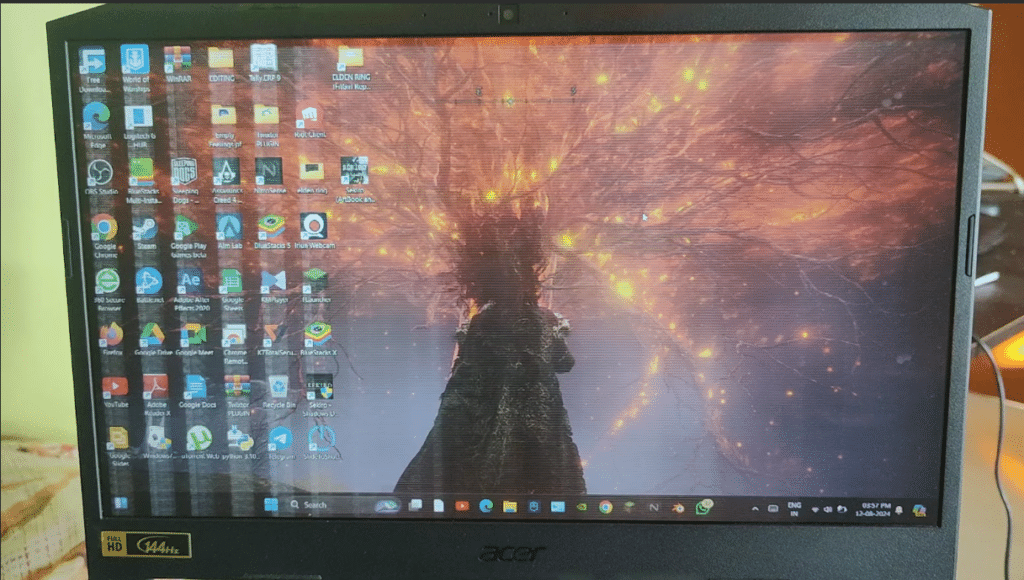
If your Acer laptop screen is flickering, blinking randomly, or showing unstable visuals, it usually starts as a small annoyance – but quickly becomes impossible to ignore. You might notice it while working, watching videos, or even during startup making the entire experience frustrating and unreliable.
In many cases, users aren’t sure whether this is a minor software glitch or a sign of deeper hardware failure. The confusion often leads to wasted time trying random fixes, or worse, ignoring the issue until the screen becomes completely unusable.
The reality is, screen flickering in Acer laptops can be caused by multiple factors – from simple driver issues to problems like a loose display cable or a failing screen panel. The key is identifying the exact cause early so you don’t end up spending more than necessary.
In this guide, we’ll walk you through practical, step-by-step fixes, help you diagnose the real issue, and explain when a screen replacement is actually required.
Why your Acer Laptop Screen Is Flickering
Before jumping into solutions, it’s important to understand what’s actually causing the flickering.
Software – Related Causes
These are usually temporary issues where the system is not displaying visuals correctly, even though the hardware is fine.
a. Outdated or corrupted graphics drivers
The software controlling your display isn’t working properly, causing unstable or inconsistent visuals.
b. Windows update bugs
Sometimes updates conflict with display settings or drivers, leading to flickering right after installation.
c. Incorrect refresh rate or display settings
A mismatch in refresh rate can cause the screen to redraw frames inconsistently, leading to visible flickering or unstable visuals.
These issues are usually fixable without opening the laptop or replacing parts.
Hardware – Related Causes
These occur when physical components inside your laptop start failing or become loose over time.
a. Damaged screen panel
The display itself is failing, which leads to constant flickering, lines, or unstable brightness.
b. Loose or worn-out display cable

The internal cable connecting the screen to the motherboard gets damaged, especially near the hinge, causing flickering when you move the lid.
Example: We recently handled an Acer Nitro series laptop where the screen flickered only when the lid was moved. The issue turned out to be a worn-out display cable near the hinge — a very common failure point.
c. GPU (Graphics Chip) issue
The component responsible for processing visuals is failing, which can cause flickering across all displays.
In our experience handling hundreds of Acer laptop repairs, nearly 70% of persistent flickering cases are caused by hardware issues like a failing screen panel or a worn-out display cable rather than software glitches.
Laptop Screen Flickering Acer Fixes
Before assuming the worst, go through these step-by-step fixes:
1. Restart Your Laptop
Temporary system glitches can cause screen flickering.
Steps:
a. Save your work
b. Hold the power button for 10-15 seconds, let the laptop shut down.
c. Wait for 1 minute and turn on the laptop.
d. Check if flickering continues.
If the issue is gone, it was likely a temporary OS or driver glitch.
2. Update or Reinstall Display Drivers
Outdated or corrupted drivers are one of the most common causes.
Steps:
a. Right-click on Start → Device Manager
b. Expand “Display Adapters”
c. Right-click your graphics card
d. Click “Update driver”
If that doesn’t work:
a. Uninstall the driver
b. Restart laptop → Windows will reinstall it automatically
This fix works especially if your Acer Laptop screen flickering started after an update.
3. Check Refresh Rate Settings.
Incorrect refresh rate can cause visible flickering.
Steps:
a. Right-click Desktop → Display Settings.
b. Go to “Advance display settings”
c. Check refresh rate (usually 60Hz for most laptops)
Set it to the recommended value.
4. Test with an External Monitor

This is the most important diagnostic test.
Steps:
a. Connect your laptop to a TV or external monitor using HDMI
b. Press Windows + P
c. Select Duplicate
d. Observe the display
Results:
- If the external display is stable → The issue is with your laptop screen or display cable
- If the external display also flickers → The problem is likely with the GPU or motherboard
This single test can save you hours of confusion.
5. Check for Loose Display Cable
Flickering when opening/closing the lid is a strong signal.
Symptoms:
a. Screen flickers when you move the hinge
b. Image cuts in and out
This usually means the internal display cable is loose or worn out.
NOTE: This step isn’t recommended unless you have experience, it can damage the panel.
Acer Laptop Screen Replacement Cost in India

The cost of fixing an Acer laptop blinking screen depends on a few factors:
a. Laptop model (Aspire, Nitro, etc.)
b. Screen size (14”, 15.6”, etc.)
c. Panel type (HD, Full HD, IPS)
Typical Price range:
₹2,500 – ₹7,000*+
The price varies depending on the exact model and screen type. Premium models with IPS panels or higher resolutions typically cost more than standard display.For the exact quotation, contact us.
Why Choose IndiRepair for Acer Laptop Screen Flickering Issues
Acer laptop screen flickering can occur due to several reasons, including outdated graphics drivers, incorrect refresh rate settings, loose display cables, backlight instability, or internal screen damage. In some cases, the flickering may appear occasionally, while in others the display may continuously blink, shake, or show unstable brightness during usage.
At IndiRepair, every Acer laptop undergoes a detailed diagnostic process to identify the exact cause of the flickering issue before any repair is recommended. The inspection includes testing the display panel, graphics drivers, refresh rate settings, motherboard output, and internal display cable connections to accurately determine whether the issue is software-related or caused by hardware failure.
For repairs and replacements, only tested and compatible components are used that match the laptop’s original display specifications, including panel quality, resolution, and refresh rate support. This is especially important for Acer gaming laptops and high-performance models where display stability and responsiveness directly impact the user experience.
Whether the issue involves screen blinking, brightness fluctuation, horizontal lines, or flickering during lid movement, IndiRepair focuses on providing reliable long-term repair solutions instead of temporary fixes.
With transparent communication, quick turnaround times, and pickup and drop support, IndiRepair aims to make Acer laptop screen repairs smooth, dependable, and hassle-free for users facing display issues.
FAQs About Acer Laptop Screen Flickering
Q.Why is my Acer laptop screen flickering randomly?
A. In our experience handling multiple Acer repairs, random screen flickering is usually caused by either unstable display drivers or a loose internal display connection. If the flickering happens occasionally and especially after a software update, it’s often driver-related. However, if it starts becoming more frequent over time, it typically indicates a hardware issue like a failing screen panel or cable.
Q. Can a flickering Acer laptop screen be fixed without replacement?
A. Yes – but only in specific cases. If the issue is caused by software (like outdated drivers or incorrect settings), it can usually be fixed without replacing any parts. However, if the flickering continues even after trying all basic fixes, then in most real-world cases, a screen replacement becomes necessary for a permanent solution.
Q. How do I know if my Acer laptop needs replacement?
A. A strong indicator is when the flickering persists regardless of what you try. Based on typical repair cases, if your screen flickers constantly, shows lines, or works fine on an external monitor but not on the laptop screen, the issue is almost always with the display panel itself. In such situations, replacing the screen is the most reliable fix.
Q. Can I replace my Acer laptop screen myself?
A. While it is technically possible, it’s not advisable unless you have prior experience. Acer screens are delicate, and even a small mistake during installation can damage the new panel or internal connectors. Most users prefer professional repair to avoid additional costs and risks.
Q. Does screen flickering mean my Acer laptop screen is damaged?
A. Not always. Flickering can be caused by both software and hardware issues. However, if the problem persists after trying basic fixes and does not appear on an external monitor, it is usually a sign of a failing screen panel.
CONCLUSION
A flickering screen on your Acer laptop might start as a minor inconvenience, but it’s often an early sign of an underlying issue that won’t fix itself. While basic troubleshooting can resolve software-related problems, persistent flickering usually points to hardware faults like a damaged screen or loose internal connections.
If the problem continues even after trying the quick fixes, it’s best to get the laptop properly checked instead of relying on trial and error. Screen-related issues tend to worsen over time, and addressing them early can prevent further damage and unnecessary inconvenience.
If you’re unsure about the exact cause or don’t want to risk further damage, it’s best to get a professional diagnosis. At IndiRepair, we offer quick and reliable Acer laptop screen diagnostics with pickup and drop service, helping you fix the issue without the hassle of trial and error.
Written by Khan Rahil, a diploma holder in Computer Hardware with over 5 years of hands-on experience in laptop repairs and Senior Technician at IndiRepair. He has personally handled hundreds of Acer screen replacements, specializing in precise compatibility checks and quality installations.