
The ASUS VivoBook keyboard replacement cost in India cannot be confirmed from the VivoBook name alone. VivoBook 14, VivoBook 15, X515, X509, X512 and other families can use different keyboard layouts, backlight configurations, connectors and replacement designs. A reliable quotation requires the complete model code, the compatible keyboard part or assembly, the keyboard layout and the service scope.
This article includes indicative India-market keyboard prices based on published supplier listings, along with IndiRepair’s VivoBook-series fitted replacement range of ₹1,999–₹3,499. It also explains how to obtain a dependable ASUS VivoBook keyboard price, why quotations vary, what a part-only price may exclude and when diagnosis should come before ordering a replacement.
Missing, damaged or unresponsive keys do not always prove that the complete keyboard must be replaced. A loose connector, liquid exposure, cable-path fault or another hardware problem can produce similar symptoms. A model-specific assessment helps prevent ordering a keyboard that looks similar but is not compatible.
Indicative ASUS VivoBook Keyboard Replacement Cost by Model or Configuration
The correct ASUS VivoBook keyboard replacement price depends on the exact model and configuration. The table below provides indicative prices from Indian keyboard supplier listings and a VivoBook-series fitted replacement estimate; they are not fixed quotations for every configuration.
| Model or category | Keyboard configuration | Estimated part-only price | Estimated fitted replacement price | Price basis or verification note |
|---|---|---|---|---|
| ASUS VivoBook 14 | Layout and backlight status must be confirmed | ₹755–₹810 (X412 examples) | ₹1,999–₹3,499 (VivoBook series) | A family name does not identify every compatible keyboard |
| ASUS VivoBook 15 | Layout, number-pad design and backlight status must be confirmed | ₹767–₹1,199 (selected models) | ₹1,999–₹3,499 (VivoBook series) | Compare only after the complete model code is checked |
| ASUS VivoBook 15 X515 | Exact submodel, layout and assembly design must be confirmed | ₹725–₹2,100 | ₹1,999–₹3,499 (VivoBook series) | A similar-looking VivoBook keyboard is not automatically suitable |
| ASUS VivoBook X509 | Exact keyboard part, layout and configuration must be confirmed | ₹810–₹967 | ₹1,999–₹3,499 (VivoBook series) | Compatibility must be checked before ordering |
| ASUS VivoBook X512 | Exact keyboard part, layout and configuration must be confirmed | ₹755–₹850 | ₹1,999–₹3,499 (VivoBook series) | Do not assume interchangeability with X509 or X515 |
| Backlit VivoBook keyboard | Backlight hardware and connector compatibility must be verified | ₹1,800–₹4,000 (indicative) | ₹1,999–₹3,499 (VivoBook series) | Backlit and non-backlit parts should not be substituted by appearance alone |
The table shows indicative supplier part prices and a series-wide fitted replacement range, not fixed quotations. A current ASUS VivoBook keyboard price should be issued only after the model label, keyboard configuration, part availability and service inclusions have been checked.
For readers who already have the model details, an appropriate next step is to request a laptop keyboard repair service assessment rather than relying on a generic search result for a VivoBook 14 or VivoBook 15 keyboard.
How to Read the Indicative Price Table
An indicative entry is useful for identifying what must be verified, but it is not a guaranteed ASUS VivoBook keyboard replacement cost. A confirmed quotation should identify the exact laptop model, the proposed keyboard or assembly and whether fitting is included.
- Compare part-only prices with other part-only prices, and fitted prices with other fitted prices.
- Check whether the quotation includes diagnosis, installation, functional testing, delivery, taxes or other disclosed charges.
- Do not treat a low component price as the complete repair cost unless fitting and other service items are explicitly included.
- Ask the provider to confirm the keyboard layout, backlight configuration and compatibility before payment or fitting.
Why ASUS VivoBook Keyboard Replacement Quotations Vary
ASUS VivoBook keyboard quotations vary because the visible keyboard is only one part of the compatibility and service decision. The keyboard design, compatible part, availability, quality category and fitting requirements can all affect the final amount.
- Keyboard design: Some replacements may involve a keyboard component, while other designs may require a larger keyboard or top-case assembly. The correct scope depends on the specific VivoBook model.
- Backlight configuration: A backlit keyboard may require matching hardware and connector compatibility. Illumination on the offered part does not prove that it will work in a particular VivoBook.
- Language and regional layout: Key legends, Enter-key shape, punctuation placement and other layout details can affect compatibility and availability.
- Part quality and source: The provider should state whether the proposed part is new, refurbished or another verified category instead of leaving the quality description unclear.
- Availability: A keyboard for a particular VivoBook may need to be sourced or verified before a final quotation can be issued.
- Service scope: Diagnosis, fitting, testing, delivery, taxes and other charges may be included or excluded depending on the quotation.
Keyboard Type and Configuration Affect the Price
The ASUS VivoBook backlit keyboard price cannot be assumed from the standard keyboard price because the parts may differ in hardware, connector arrangement or assembly design. A backlit option should be considered compatible only after the relevant part and laptop configuration have been checked.
- A standard keyboard and a backlit keyboard should be compared only when both parts are confirmed for the same model configuration.
- A keyboard assembly may include additional attached components, but the exact assembly scope must be confirmed rather than assumed from photographs.
- A non-backlit VivoBook should not be treated as upgradeable to backlit through a keyboard-only replacement without confirmed hardware compatibility.
- The number of keys, language layout, number pad and backlight indicators should match the proposed replacement.
Availability, Part Quality and Service Scope
Two quotations can differ even when the keyboards look similar because the parts may have different quality descriptions, availability conditions or service inclusions. A meaningful comparison requires both providers to describe the price on the same basis.
- Ask whether the quoted component is a confirmed model-specific part or a compatible replacement whose suitability still needs checking.
- Ask whether the component is new, refurbished or another verified quality category.
- Confirm whether the quoted amount covers the component only or includes fitting and functional testing.
- Ask whether diagnosis is included when the symptoms could involve a connector, liquid damage or another hardware fault.
- Check whether delivery, taxes or other service charges are separate.
- Do not assume that a part is currently available until the provider confirms availability.
With experience across 500+ laptop repairs, IndiRepair approaches keyboard replacement as a compatibility and diagnosis decision rather than treating every VivoBook keyboard symptom as proof of one standard part. book your Asus laptop repair with IndiRepair after sharing the complete model and keyboard details.
How to Confirm the Correct VivoBook Keyboard
The complete ASUS VivoBook model code is more useful than the broad family name when requesting a price. A provider may also need the keyboard layout, backlight status, visible assembly details and a description of the fault before confirming the appropriate part.
- Record the complete model code. Look for the model information on the laptop exterior, packaging, purchase record or system information, depending on what is safely available. A broad label such as VivoBook 15 is usually not enough to identify the exact replacement.
- Describe the keyboard configuration. Note the language layout, number pad, key arrangement and whether backlighting is present or visibly indicated.
- Describe the symptom. State whether individual keys are physically damaged, several keys are unresponsive, the entire keyboard fails, or input works intermittently.
- Share safe photographs. A clear photograph of the exterior model label and keyboard can help with an initial assessment. Conceal personal information where appropriate and do not open the laptop solely to photograph internal connectors.
- State the preferred service basis. Explain whether you need the component only or a fitted replacement with testing.
A similar-looking keyboard for an X515, X509, X512, VivoBook 14 or VivoBook 15 should not be ordered without compatibility confirmation. Model families can contain different layouts, generations and configurations.
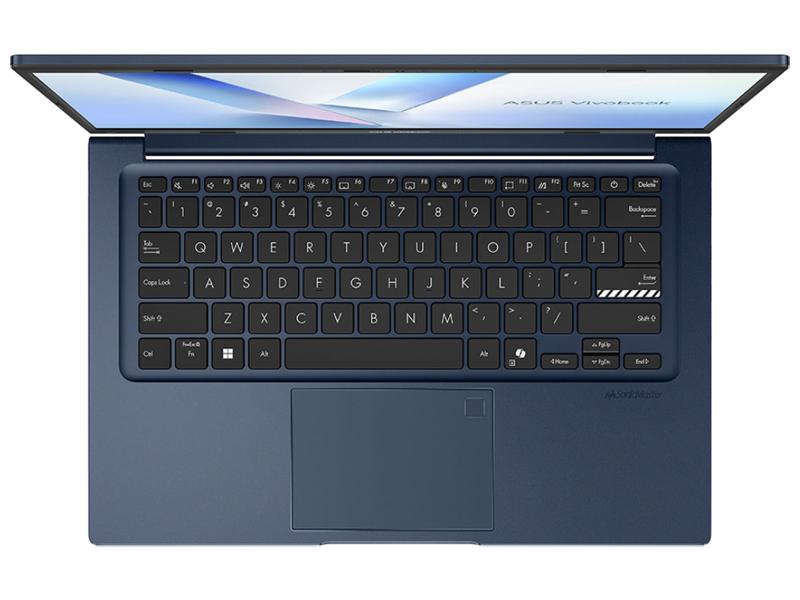
The safest use of a model photograph is to support identification, not to prove internal compatibility. The complete model code and a provider’s written confirmation remain more useful than appearance alone.
Information to Share Before Requesting a Quotation
A precise quotation becomes easier when the provider receives the information that distinguishes similar-looking keyboards.
- Complete ASUS VivoBook model code and any product information requested for identification.
- Clear photograph of the exterior label or system model information, with personal data concealed where appropriate.
- Photograph of the keyboard showing the layout, language markings, number pad and visible backlight indicators.
- Description of whether the fault affects individual keys, the entire keyboard or intermittent input.
- Preference for part-only supply or fitted replacement.
- History of liquid exposure, impact, recent opening or attempted repair.
Compatibility Checks Before Ordering
Before ordering an ASUS VivoBook keyboard, confirm the part against the complete model and configuration rather than relying on the screen size or product-family name.
- Match the complete VivoBook model code, not only the screen size or family name.
- Compare the keyboard layout, language, key arrangement, number pad and backlight configuration with the offered part.
- Ask the supplier or repair provider to confirm compatibility before payment or fitting.
- Confirm whether the quoted component is a keyboard-only part or a larger assembly, and ask whether the connector and mounting method match.
- Keep the written compatibility confirmation and quotation details if you contact more than one provider.
These checks reduce the risk of comparing an ASUS VivoBook 15 X515 keyboard price with a part intended for another configuration. They also help separate a genuine model-specific quotation from a generic listing.
Part-Only Price Versus Fitted Replacement Cost
A part-only ASUS VivoBook keyboard price and a fitted replacement quotation are different price bases. The part-only amount may cover the component but exclude installation, testing, diagnosis, delivery or other charges. A fitted quotation should state what service work is included.
| Price basis | What it may cover | What must be confirmed separately |
|---|---|---|
| Part-only supply | The keyboard component or specified assembly | Compatibility, fitting, testing, diagnosis, delivery, taxes and other charges |
| Fitted replacement | A compatible keyboard, fitting or labour and stated functional testing | Diagnosis scope, part quality, delivery, taxes, exclusions and conditions that could change the quotation |
Diagnosis may be separate when the symptom could originate in a connector, liquid-related damage, cable path or another hardware area. Replacing the keyboard without checking the cause may not resolve a complete or intermittent input failure.
What to Confirm in a Full Quotation
A complete quotation should make the model, component and service scope clear before the work is authorised.
- Exact laptop model and keyboard configuration used for the quotation.
- Part description, assembly scope and confirmed compatibility.
- Whether the amount is part-only or includes fitting and testing.
- Whether diagnosis is included or charged separately.
- Any disclosed delivery, tax or other service charges.
- Conditions under which the quotation may change after inspection.
- Written confirmation of the final fitted total before authorising the work.
When to Request Diagnosis Before Ordering a Replacement
Diagnosis is sensible when the symptoms do not clearly identify a physically damaged keyboard. The following are possible causes, not confirmed diagnoses, and each may require a different repair decision.
1. Individual Key Damage
A worn, broken or missing key may indicate a physical keyboard problem. The correct solution could depend on whether the damage is limited to a key mechanism or affects the keyboard assembly. The replacement scope should be confirmed before ordering.
2. Complete Keyboard or Connector Fault
A completely unresponsive keyboard can involve the keyboard, connector, cable path or another hardware fault. A replacement keyboard may not resolve the problem if the signal path or connection is also affected.
3. Liquid-Related Damage
Intermittent or progressively failing input after liquid exposure should be inspected before a keyboard is ordered. Liquid can affect more than the visible keys, so a keyboard-only quotation may not describe the full repair requirement.
4. Wider Hardware Issue
A fault that occurs alongside other input or system functions may indicate a wider hardware issue rather than a keyboard-only failure. Professional inspection becomes more useful when the symptom pattern is unclear.
Stop using the laptop and seek professional help rather than continuing DIY work if you notice any of the following:
- Swelling, smoke, sparks, burning smell or extreme heat.
- Liquid exposure, melting or exposed wires.
- A visibly damaged keyboard connector, laptop port or charger.
- Repeated intermittent faults after an impact or attempted opening.
IndiRepair recommends treating a keyboard symptom as evidence to investigate, not automatic proof that one component has failed. A practical diagnostic review can help distinguish a keyboard replacement from a connector, liquid-related or wider hardware concern. get your Asus laptop checked by IndiRepair when the model or fault details do not provide enough certainty for a safe order.
Quotation and Booking Guidance for ASUS VivoBook Keyboard Replacement
The most reliable way to obtain an ASUS VivoBook keyboard replacement cost is to request a model-specific assessment. Include the complete model code, keyboard layout, backlight status, fault description and whether you want a part-only or fitted service.
- Provide the exact VivoBook model code rather than only saying VivoBook 14 or VivoBook 15.
- Identify the keyboard layout, language markings, number pad and backlight status.
- Explain the symptom and any history of liquid exposure, impact or attempted repair.
- Ask whether the proposed part is a keyboard-only component or a larger assembly.
- Request confirmation of compatibility before ordering.
- Compare the complete fitted quotation, included testing and disclosed charges instead of comparing the component price alone.
- Ask whether inspection is needed before a final price is confirmed.
IndiRepair can use these details to understand whether the request is for a replacement component, a fitted keyboard service or an assessment of a less certain fault. Sharing accurate information first helps keep the quotation aligned with the actual ASUS VivoBook configuration.
Frequently Asked Questions
Q: What is the ASUS VivoBook keyboard replacement cost in India?
A: IndiRepair lists an indicative VivoBook-series fitted replacement cost of ₹1,999–₹3,499 including parts and service. The final amount depends on the complete model code, keyboard layout, backlight configuration, compatible part or assembly, availability and whether fitting, testing and diagnosis are included. A part-only listing should not be compared directly with a fitted replacement quotation. To obtain a reliable amount, provide the model code, a keyboard photograph, the fault description and your preferred part-only or fitted service basis.
Q: Why is the ASUS VivoBook keyboard price different for VivoBook 14 and VivoBook 15 models?
A: VivoBook 14 and VivoBook 15 describe broad product families rather than one universal keyboard. Different generations and configurations can use different layouts, number-pad designs, backlight options, connectors or assembly structures. Screen size alone does not confirm compatibility. A VivoBook 14 or VivoBook 15 price should therefore be treated as an initial category reference until the complete model code and keyboard configuration are verified.
Q: How much might an ASUS VivoBook 15 X515 keyboard cost compared with another VivoBook keyboard?
A: Published part-only listings for selected VivoBook X515 keyboards range from *₹725 to *₹2,100 in India. The exact X515 keyboard price cannot be inferred from another VivoBook model because similar-looking parts may have different layouts or mounting and connector requirements. The quotation may also differ depending on whether the proposed replacement is standard, backlit, keyboard-only or part of a larger assembly. Request confirmation against the complete X515 model code and ask whether the quoted amount is part-only or includes fitting and testing.
Q: Are ASUS VivoBook X509 and X512 keyboards interchangeable?
A: Interchangeability should not be assumed. X509 and X512 are different model families, and the correct part can depend on the exact submodel, layout, backlight configuration, connector and assembly design. A photograph showing a similar key arrangement is not enough to establish compatibility. Ask a supplier or repair provider to confirm the proposed part for the complete model code before ordering or fitting it.
Q: Does the ASUS VivoBook keyboard replacement price include fitting and testing?
A: Not necessarily. A part-only price may exclude fitting, functional testing, diagnosis, delivery, taxes and other service charges. A fitted replacement quotation should state whether it includes the compatible component, installation and testing, but the exact inclusions still need to be confirmed in writing. Compare quotations only when they use the same price basis and clearly identify any charges that remain separate.
Q: Is a backlit VivoBook keyboard more expensive than a non-backlit keyboard?
A: A backlit and non-backlit keyboard may use different compatible parts, so their quotations can differ. However, no specific price difference should be assumed without current verified pricing for the exact model. Backlight hardware, connector compatibility, availability and assembly scope all need confirmation. The correct comparison is between verified parts for the same VivoBook configuration, not between generic backlit and non-backlit listings.
Q: Can a backlit keyboard be fitted to a VivoBook that originally had a non-backlit keyboard?
A: A backlit keyboard should not be treated as a simple upgrade unless compatibility is confirmed. The laptop may require matching hardware, connector support and a suitable assembly, and illumination on the replacement part alone does not prove that the laptop can operate it. Ask for model-specific confirmation before ordering. If the request is for a replacement rather than an upgrade, match the offered part to the original configuration unless a compatible alternative is verified.
Q: What information is needed for an accurate ASUS VivoBook keyboard quotation?
A: Provide the complete VivoBook model code, a clear photograph of the model label or system information, photographs of the keyboard layout, backlight status, language markings and number pad, and a description of the fault. Mention liquid exposure, impact, recent opening or attempted repair if applicable. Also state whether you need the component only or a fitted service. These details help the provider distinguish similar keyboards and identify whether diagnosis may be needed first.
Q: Should I order a replacement keyboard if only some keys are not working?
A: Not automatically. Individual non-working keys can result from physical wear or damage, but they can also be associated with contamination, liquid exposure, an internal connection issue or another fault. If the keys are physically broken or missing, replacement may be appropriate after the correct part is confirmed. If the problem is intermittent or followed liquid exposure, request diagnosis before ordering so that a keyboard-only replacement does not overlook a wider issue.
Q: Could a connector, liquid-damage or motherboard issue cause a keyboard problem instead of a faulty keyboard?
A: Yes, those are possible causes, particularly when the entire keyboard is unresponsive, input is intermittent or the problem began after liquid exposure or impact. The symptom alone does not identify which component has failed. A safe inspection can help distinguish the keyboard from its connection or another hardware area. Do not probe internal electrical parts or continue using a laptop that has smoke, sparks, burning smell, melting or extreme heat.
Conclusion: Confirm the VivoBook Configuration Before Comparing Prices
The ASUS VivoBook keyboard replacement cost depends on the exact model, compatible keyboard part, layout, backlight configuration, availability, part quality and service inclusions. A generic VivoBook keyboard price is not a confirmed quotation, especially when X515, X509, X512, VivoBook 14 and VivoBook 15 configurations may differ.
Compare the complete fitted quotation when you need installation, testing or diagnosis, and compare part-only prices only when you specifically need the component alone. If the symptoms could involve a connector, liquid damage or another hardware fault, request an assessment before ordering.
For a model-specific evaluation, share the full ASUS VivoBook model code, keyboard details and fault description with IndiRepair. When professional assessment or replacement is appropriate, choose Asus laptop repair with IndiRepair and confirm the written quotation before authorising the work.