
The ASUS ZenBook keyboard replacement cost depends on the complete model code, keyboard layout, replacement assembly, part availability and service scope. A ZenBook family name or screen size alone is not enough to confirm a reliable price, and no fixed ASUS price applies to every ZenBook keyboard.
The final quotation may cover a standalone keyboard, a keyboard supplied with a top-case or palm-rest assembly, fitting, testing, diagnosis, taxes and shipping. These inclusions must be confirmed for the specific laptop. The figures discussed below are quotation-planning guidance rather than fixed ASUS prices, and an accurate amount requires the complete model code and keyboard specification.
ZenBook models can differ in their keyboard layout, language, backlight configuration, connector and mounting arrangement. A keyboard that looks similar or belongs to the same ZenBook 13, 14 or 15 family may still be incompatible. IndiRepair can help assess the model and replacement scope, and its Asus laptop screen replacement service page is available for arranging an ASUS laptop assessment.
With experience across 500+ laptop repairs, IndiRepair focuses on identifying the underlying fault and the required assembly before recommending a replacement.
book your Asus laptop repair with IndiRepair
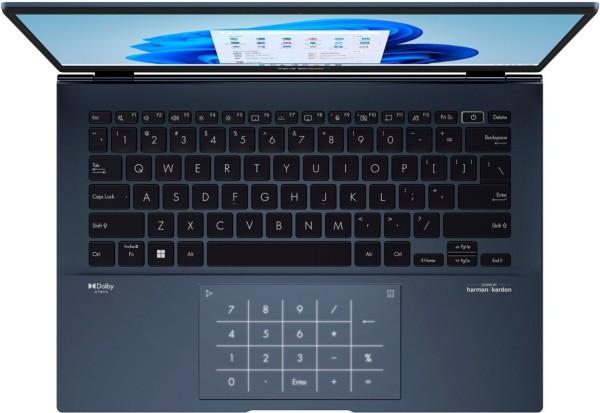
A clear photo of the keyboard and the complete model label can help a service provider distinguish a genuine compatibility question from a simple screen-size match. The image should support identification, not suggest that one universal keyboard price applies to every ZenBook.
ASUS ZenBook Keyboard Replacement Cost by Model or Category
The table below shows indicative India-market ZenBook keyboard prices from published supplier listings and repair-service estimates reviewed on 7 November 2026. Part-only examples are not guaranteed prices for every variant, and the IndiRepair fitted range is series-wide rather than a confirmed quote for each model.
| ZenBook model or category | Keyboard-part estimate | Complete fitted replacement | Price basis | Verification required |
|---|---|---|---|---|
| ZenBook 13 | *₹2,499 (UX325 example) | ₹2,499–₹4,999 (IndiRepair series-wide) | Keyboard-only or larger assembly | Full model code, layout, backlight and availability |
| ZenBook 14 | ₹2,499–₹2,999 (selected 14-inch models) | ₹2,499–₹4,999 (IndiRepair series-wide) | Keyboard-only or larger assembly | Full model code, layout, backlight and availability |
| ZenBook 15 | ₹3,499–₹4,999 (UX533/UX534 listings) | ₹2,499–₹4,999 (IndiRepair series-wide) | Keyboard-only or larger assembly | Full model code, layout, backlight and availability |
| ZenBook UX325 | *₹2,499 (listed UX325 keyboard) | ₹2,499–₹4,999 (IndiRepair series-wide) | Part-only or fitted replacement | Complete UX325 model code and keyboard specification |
| ZenBook UX425 | *₹2,999 (listed backlit keyboard) | ₹2,499–₹4,999 (IndiRepair series-wide) | Part-only or fitted replacement | Complete UX425 model code and keyboard specification |
| ZenBook OLED and other special configurations | ₹2,000–₹4,500 (general ZenBook part estimate) | ₹3,500–₹5,000 (OLED service examples) | Specific compatible assembly and service scope | Exact model code, layout and replacement configuration |
The amounts in the table are indicative published examples, not fixed ASUS quotations. The *₹4,999 ZenBook 15 keyboard listing was marked sold out when reviewed. A keyboard-part price and a complete fitted-replacement quotation are different amounts because the second may include diagnosis, removal, fitting, testing, taxes, shipping or additional work.
ZenBook 13, 14 and 15 Series
Searches for the ASUS ZenBook 13 keyboard price, ASUS ZenBook 14 keyboard price and ASUS ZenBook 15 keyboard price are useful starting points, but screen size does not identify a compatible keyboard. Different generations in the same size category can use different layouts, connectors, mounting arrangements or replacement assemblies.
Before treating any series-level estimate as applicable, confirm whether the quoted item is a standalone keyboard, a keyboard with a top case or another assembly. The provider should also confirm the language layout, key legends and any required backlight or special-key features.
ZenBook UX325 and UX425 Models
| Model family | What a price search can establish | What it cannot establish |
|---|---|---|
| ZenBook UX325 | It identifies a model family for quotation research | It does not prove compatibility with every UX325 variant |
| ZenBook UX425 | It identifies a model family for quotation research | It does not prove compatibility with every UX425 variant |
The ASUS ZenBook UX325 keyboard price and ASUS ZenBook UX425 keyboard price should be checked against the complete model code, regional layout and proposed assembly. A family label may cover configuration or regional differences that affect the correct replacement part.
Ask the provider whether the estimate is for the part only or includes fitting and functional testing. A complete model code from the device label or system information is more useful than the UX325 or UX425 family name alone.
ZenBook OLED and Other Special-Configuration Models
An ASUS ZenBook OLED keyboard replacement cost cannot be determined from the OLED branding alone. The exact model code still identifies the relevant keyboard configuration, layout and assembly.
- Confirm the exact model code rather than relying only on the OLED product name.
- Ask whether the proposed replacement is keyboard-only or part of a larger assembly.
- Request an availability check before approving work on a less commonly stocked configuration.
- Have the provider confirm the keyboard layout and required features against clear photographs.
How to Read the Estimate
- Keyboard-part price: This may cover only the replacement component and may exclude fitting, testing and diagnosis.
- Complete fitted quotation: This may include removal, installation and functional testing, but the exact inclusions must be stated.
- Additional charges: Taxes, shipping, inspection or related component work may be separate, depending on the provider.
- Inspection adjustment: The quote may change if the technician finds damage to the top case, connector, ribbon cable or surrounding components.
Why ZenBook Keyboard Replacement Cost Varies
ZenBook keyboard replacement quotations vary because the keyboard is not identified by the product family name alone. The part, assembly and service scope must all match the laptop being repaired.
- Exact model code and generation: The complete code helps identify the correct replacement rather than a visually similar keyboard.
- Assembly type: A standalone keyboard can have a different price from a keyboard supplied with a top case or palm-rest assembly.
- Language and regional layout: Key legends, arrangement and regional versions can affect compatibility.
- Backlight and special-key configuration: These features should be confirmed for the specific model instead of assumed from the series name.
- Part status: A provider may offer an original-equipment, compatible or refurbished part, but the actual source and condition should be stated rather than assumed.
- Availability: The quotation can depend on whether a compatible replacement is currently available.
- Related physical damage: Damage to clips, the top case, palm rest, connector or ribbon cable may require additional work.
- Fault location: The keyboard may not be the only possible cause when input is intermittent or multiple keys stop responding.
- Service inclusions: Diagnosis, fitting, testing, taxes, shipping and post-service terms may be included or charged separately.
A low keyboard-part price is not automatically a lower repair cost if fitting, diagnosis, shipping or a required larger assembly is excluded. Comparing complete quotations prevents misleading price comparisons.
How to Confirm the Correct ZenBook Keyboard Before Ordering
The safest way to request an ASUS ZenBook keyboard replacement price is to provide the complete model code, keyboard layout and clear photographs before ordering. Compatibility should be confirmed against the proposed part or supplier record when that information is available.
Model Code, Layout and Assembly Checks
- Provide the complete model code. Share the full code from the laptop label or available system information instead of sending only “ZenBook 14,” “UX325” or “UX425.”
- Compare the keyboard language and key arrangement. Check the visible key legends, layout and special keys against the proposed replacement.
- Confirm backlight requirements where applicable. Do not assume that a replacement has the same backlight configuration as the original keyboard.
- Confirm the assembly type. Ask whether the part is keyboard-only, supplied with a top case or included in another larger assembly.
- Share clear photographs. Include the keyboard, model label and any visible damage so the provider can assess compatibility and replacement scope.
- Ask for part or supplier confirmation when available. If the proposed item cannot be matched confidently to the model and layout, pause the order until compatibility is clarified.
These checks reduce the risk of treating a screen-size match or family label as proof of compatibility. They do not replace a technician’s inspection when the laptop has liquid damage, physical deformation or an intermittent keyboard fault.
Repair Versus Replacement and Service Inclusions
A technician may need to diagnose the keyboard fault before confirming whether replacement is appropriate. The visible symptom can come from the keyboard assembly, connector, ribbon cable, top case or another related component, so a symptom is not proof of a specific failed part.
- Multiple unresponsive keys can indicate a keyboard or connection problem, but the affected area still needs assessment.
- A single loose or damaged keycap may not require the same work as a damaged keyboard assembly.
- Intermittent input can require connector and surrounding-component checks before a replacement is approved.
- Liquid exposure can affect more than the visible keys and should be disclosed before quoting.
- Damage to the membrane, mounting points or larger assembly may make replacement more suitable than a minor repair, depending on the model design.
Before approving an ASUS laptop keyboard replacement cost, confirm whether the service includes diagnosis, the compatible part, removal and fitting, connector inspection, functional testing and inspection for related damage. Taxes, shipping, warranty terms and any post-service conditions should be written into the quotation rather than assumed.
IndiRepair can assess the repair scope without treating a symptom as automatic proof that the keyboard alone has failed. If the laptop also has display damage or another visible issue, the get your Asus laptop checked by IndiRepair link provides a way to request an assessment.
What to Ask for in an ASUS ZenBook Keyboard Quotation
A useful quotation should identify the laptop and the exact work being priced. Ask for the following details before comparing providers or approving a replacement.
- Is the quotation based on the complete ZenBook model code rather than only the series name?
- Does the stated price cover the keyboard part only or a complete fitted replacement?
- Is the keyboard language and key arrangement confirmed to match the original?
- Is the quoted assembly keyboard-only, keyboard-plus-top-case or another configuration?
- Are fitting, connector inspection, testing, diagnosis, taxes and shipping included or separate?
- Will the price change if the technician finds damage to the top case, ribbon cable, connector or related components?
- How long is the quotation valid, and can part availability change before booking?
- Are any warranty or post-service terms supplied in writing?
- What model information and photographs are needed to confirm compatibility?
IndiRepair’s practical experience across laptop repairs supports a model-first quotation process: identify the laptop, establish the replacement scope and then compare what the quoted amount actually includes.
Frequently Asked Questions
Q: What is the ASUS ZenBook keyboard replacement cost in India?
A: Published Indian listings put selected ZenBook keyboard-only parts at approximately ₹2,499–₹4,999, while IndiRepair publishes ₹2,499–₹4,999 for fitted ZenBook keyboard replacement across its series. These are indicative examples, not a model-specific guaranteed quote. The final amount depends on the complete model code, keyboard layout, assembly type, part availability and service inclusions. A keyboard-only part price may differ from a fitted replacement quotation that includes diagnosis, installation and testing. Share the model code and clear keyboard photographs with a repair provider to obtain a model-specific assessment.
Q: Does the ASUS ZenBook keyboard replacement price include fitting and testing?
A: Not necessarily. Some quotations describe the replacement part only, while others cover fitting and functional testing as part of a complete service. Diagnosis, connector inspection, taxes, shipping and related work may also be separate. Ask the provider to state each inclusion in writing before approval. A quoted keyboard-part price should not be compared directly with a fitted replacement quotation unless both quotations cover the same scope.
Q: Why can the ASUS ZenBook 13, 14 and 15 keyboard prices differ?
A: The screen-size category does not identify the exact keyboard assembly. Different generations can use different layouts, connectors, mounting arrangements, backlight configurations or top-case designs. Part availability and the difference between a keyboard-only component and a larger assembly can also affect the quotation. Confirm the complete model code and ask whether the quoted amount covers the part alone or fitting and testing as well.
Q: Is the ASUS ZenBook UX325 keyboard compatible with every UX325 variant?
A: Compatibility should not be assumed across every UX325 variant. The complete model code, regional keyboard layout, visible assembly and any applicable part information should be matched before ordering. A keyboard that fits the UX325 family generally may still differ from the one required by a particular configuration. Send the model label and keyboard photographs to the provider and request confirmation of the proposed part before payment or installation.
Q: Is the ASUS ZenBook UX425 keyboard compatible with every UX425 variant?
A: No universal compatibility should be assumed from the UX425 name alone. Regional layout, generation, keyboard features and assembly design may affect the correct replacement. The provider should compare the complete model code and proposed part details with the original laptop. Ask whether the price is for a standalone keyboard or a larger fitted assembly, because that distinction affects both compatibility and the final ASUS ZenBook UX425 keyboard price.
Q: How can I find the complete ASUS ZenBook model code before requesting a quote?
A: Check the laptop’s product label or the model information available through the operating system, and record the full code rather than only the ZenBook series name. If the laptop is difficult to start, photograph the exterior label and keyboard clearly. The exact location and displayed information can vary, so follow the relevant ASUS documentation for the device rather than using an unverified menu path. A repair provider can also help identify the model during assessment.
Q: Does an ASUS ZenBook OLED keyboard replacement cost more than another ZenBook keyboard?
A: The OLED label alone does not establish a higher or lower price. The quotation still depends on the exact model code, keyboard layout, replacement assembly, availability and service scope. A less commonly stocked part may require a separate availability check, but that should not be described as a guaranteed premium without current evidence. Ask for the compatible part description and a complete fitted quotation before comparing an OLED model with another ZenBook.
Q: Should I replace the keyboard if only a few keys are not working?
A: Not automatically. A few failed keys may relate to physical key damage, the keyboard assembly, a connector or another fault, and the correct remedy depends on the inspection. A loose keycap can involve different work from damage affecting the keyboard membrane or mounting points. Avoid forcing keys or opening the laptop without the correct model-specific guidance. A technician can determine whether a minor repair, connector attention or complete replacement is appropriate.
Q: What should I confirm before accepting an ASUS laptop keyboard replacement quotation?
A: Confirm that the quotation identifies the complete model code, keyboard language, layout and assembly type. Ask whether the amount includes the part, fitting, connector inspection, testing, diagnosis, taxes and shipping. Also ask what happens if related damage is found and whether any post-service terms are provided in writing. These details make it possible to compare a complete replacement quotation with a part-only price without confusing different levels of service.
Q: Can the final price change after the laptop is inspected?
A: Yes. An inspection can reveal a different model or layout, a larger assembly requirement, connector or top-case damage, liquid exposure or another fault affecting the repair scope. The initial estimate may therefore change before work is approved. Request an updated quotation that explains the newly identified part or service requirement. Do not approve additional work until the revised inclusions and total amount are clear.
Conclusion: Confirm the Model Before Booking
The exact ASUS ZenBook model and keyboard assembly determine compatibility and replacement cost. An indicative keyboard-part price is not the same as a complete fitted quotation, so confirm the part, layout, assembly type, availability, fitting, testing, diagnosis, taxes and shipping before approving work.
Send the complete ZenBook model code, keyboard layout and clear photographs when requesting an assessment. If the laptop shows swelling, smoke, sparks, burning smell, liquid exposure, exposed wires, melting, extreme heat or a visibly damaged connector or charger, stop using it and seek professional help rather than continuing DIY checks.
For a model-specific decision, IndiRepair can review the available information and explain what needs to be confirmed before replacement. You can request Asus laptop repair with IndiRepair after checking the quotation details and service scope.