An Acer laptop screen dim issue can make even basic tasks difficult – especially when the brightness is already set to maximum but the display still appears too dark. Many users notice that the screen is barely visible in normal lighting or becomes readable only in a dark room.
This problem can show up in different ways – sometimes the brightness doesn’t increase at all, sometimes the screen suddenly becomes dim after an update, and in some cases, the display is visible only when you shine a flashlight on it.
The important thing to understand is that not every dim screen is caused by settings. In our repair experience at IndiRepair, a good number of cases are linked to power settings or driver issues, but a large portion – especially when the screen stays dim consistently– is caused by backlight failure or internal display faults.
Common Acer Laptop Screen Dim Issues
Before troubleshooting, identify which situation matches your case:
a. Screen is dim even at 100% brightness
b. Brightness slider is not working
c. Screen becomes dim randomly
d. Display is visible only with a flashlight
e. Screen dimming after Windows update
f. Laptop works fine but brightness keeps reducing automatically
g. External monitor looks normal but laptop screen is dim
Understanding this helps you quickly identify whether the issue is software-related or hardware-related.
How To Fix Acer Laptop Screen Dim
Follow these steps one by one. After each step, check if the brightness returns to normal.
Step 1: Check Brightness Settings
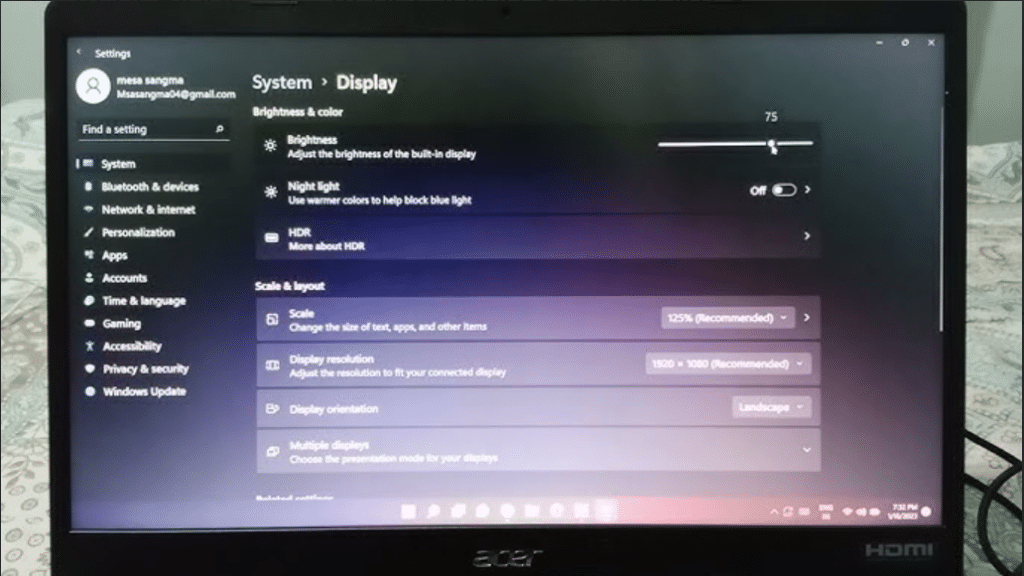
Steps:
a. Press brightness increase key (Fn + brightness key)
b. Go to Settings → Display
c. Set brightness to maximum
What this tells you:
a. Brightness improves → settings issue
b. No change → move to next step
Step 2: Disable Adaptive Brightness
Steps:
a. Go to Control Panel → Power Options
b. Click “Change plan settings”
c. Open “Advanced power settings”
d. Disable adaptive brightness
What this tells you:
a. Brightness stabilizes → power settings issue
b. Still dim → continue
Step 3: Update or Reinstall Graphics Drivers
Steps:
a. Open Device Manager
b. Expand Display Adapters
c. Update or uninstall and reinstall driver
What this tells you:
a. Brightness works normally → driver issue
b. No improvement → move ahead
Step 4: External Monitor Test
Steps:
a. Connect laptop to external monitor via HDMI
b. Turn on laptop
What this tells you:
a. External display is bright and normal → internal screen issue
b. External display also dim → possible system or GPU issue
If the external display works normally, it confirms that the GPU is functioning correctly and the issue is limited to the laptop screen.
Step 5: Flashlight Test
Steps:
a. Turn on the laptop
b. Shine a flashlight closely on the screen
c. Look for faint icons or desktop
What this tells you:
a. Faint image visible → backlight failure
b. No image → deeper display issue
This is one of the most reliable ways to identify backlight problems. This confirms that the display panel is still generating an image, but the backlight is not illuminating it properly.
Step 6: Boot into Safe Mode
Steps:
a. Restart and interrupt boot 2-3 times
b. Enter Recovery → Safe Mode
What this tells you:
a. Screen brightness normal → software issue
b. Still dim → hardware issue
Step 7: Reset Power Settings
Steps:
a. Go to Power Options in Control Panel
b. Restore default settings
What this tells you:
a. Brightness returns → configuration issue
b. No change → likely hardware fault
When Repair or Screen Replacement is Required

Professional repair is recommended if:
a. Screen is dim even at maximum brightness
b. Flashlight test shows faint display
c. External monitor works normally
d. Brightness settings and drivers don’t fix the issue
e. Screen dimming is consistent and not temporary
In these cases, the issue is usually within the screen assembly, getting the screen checked early helps avoid further visibility issues and ensures the problem doesn’t worsen over time.
Why Choose IndiRepair for Acer Laptop Dim Screen Issues
A dim screen on an Acer laptop can be caused by multiple factors, including adaptive brightness settings, graphics driver conflicts, backlight failure, loose display connections, or internal hardware faults. While some brightness issues may appear minor initially, persistent dimness often indicates a deeper display-related problem that requires proper diagnosis.
At IndiRepair, every Acer laptop goes through a structured inspection process to identify the exact reason behind the dim display issue before any repair is recommended. In many cases, the problem may not be with the screen itself but with the backlight circuit, display cable, graphics driver, or motherboard power delivery system. Accurate diagnosis helps avoid unnecessary replacements and ensures the correct solution is applied.
For screen repairs and replacements, only tested and compatible display panels are used that match the laptop’s original specifications, including brightness levels, panel quality, and resolution compatibility. This is especially important for Acer laptops used for professional work, gaming, and long hours of daily usage where display clarity directly impacts user experience.
Whether the issue is low brightness even at maximum settings, dimness on battery power, flickering brightness, or a failing backlight, IndiRepair focuses on providing long-term repair solutions instead of temporary fixes.
With transparent communication, quick turnaround times, and pickup and drop support, IndiRepair aims to make Acer laptop screen repairs reliable, convenient, and stress-free.
Frequently Asked Questions
Q. Why is my Acer Laptop Screen Dim even at full brightness?
A. If your screen stays dim even at 100% brightness, it usually means the issue is not with settings but with the display itself. In many real cases, this happens when the backlight inside the screen starts failing. The display is still working, but the light that makes it visible is weak or not functioning properly.
Q. Why does my Acer Laptop Screen Dim Automatically?
A. Automatic dimming is usually caused by power-saving features like adaptive brightness or battery optimization settings. However, if the brightness drops randomly even when these settings are disabled, it could indicate an unstable power supply to the screen or an early-stage hardware issue.
Q. How do I confirm if it’s a backlight problem?
A. The easiest way is the flashlight test. If you shine a light on the screen and can see faint content, it confirms that the display panel is working but the backlight is not. This is one of the most common causes of a consistently dim screen.
Q. Can a dim laptop screen be fixed without replacing the screen?
A. If the issue is related to software, drivers, or settings, it can be fixed without replacing any parts. But if the dimness is caused by backlight failure or internal panel damage, replacement is usually the only reliable long-term solution.
Q. How much does it cost to fix a dim Acer laptop screen?
A. The cost depends on the cause. Software-related fixes are usually minimal, but if the screen needs replacement, it typically ranges between ₹2500 to ₹7000 depending on the model and display type.
CONCLUSION
An Acer laptop screen dim issue often looks like a simple brightness problem, but in many cases, it points to something deeper within the display system. While settings and driver–related issues can cause temporary dimming, a screen that remains consistently dark –especially at full brightness – usually indicates a backlight or internal hardware fault.
The key is to observe how the screen responds during basic checks. If brightness settings, driver updates, and power adjustments don’t make a difference, it’s a sign that the issue is not software-related. In real-world cases, this is where most users realize the problem lies within the screen itself rather than the system.
Addressing it early helps avoid ongoing strain and usability issues. Once the root cause is identified, the solution becomes straightforward – either a minor fix or a proper screen replacement to restore normal visibility.
If your Acer laptop screen remains dim after trying all the basic fixes, it’s best to get it professionally checked instead of continuing trial-and-error troubleshooting.
At IndiRepair, we provide quick diagnosis and reliable screen repairs with pickup and drop service, helping you restore normal brightness without unnecessary delays.
Written by Khan Rahil, a diploma holder in Computer Hardware with over 5 years of hands-on experience in laptop repairs and Senior Technician at IndiRepair. He has personally handled hundreds of Acer screen replacements, specializing in precise compatibility checks and quality installations